Capsule CRM has been focusing on core relationship tracking, transparent pricing. It is the ideal solution for growing teams looking to transit away from spreadsheets without the administrative headache.
Capsule CRM is a cloud-based Customer Relationship Management tool built by Manchester-based Zestia. Launched in 2009, it was designed specifically to eliminate the complexity, bloat, and high cost of traditional enterprise software.
Rather than offering over-engineered automation, Capsule provides small-to-medium businesses, freelancers, and service teams with a clean, intuitive platform to centralize contacts, track sales pipelines, and manage post-sale tasks. It solves the common headache of fragmented customer data and low team adoption by focusing on a simple, chronological interaction timeline.
What is Capsule CRM?
Capsule CRM is a cloud-based Customer Relationship Management platform designed for small businesses, freelancers, and service teams. It is known for its easy to use interface to startups and small businesses by focusing on centralizing contact histories, track visual sales pipelines, and manage post-sale tasks, making it simple to organize client relationships without administrative friction.
Key Features of Capsule CRM
As Capsule CRM is filled with high tech features focused to ease selling for startups and small businesses, the software can support big teams as well. Let’s explore some of its features.
Contact Management
Customer Profile
Capsule CRM creates a customer profile which serves as the digital foundation for your entire database. Beyond storing standard contact details like phone numbers and email addresses, these profiles are highly customizable.
You can easily add custom fields to track industry-specific details such as a client’s budget, preferred contact method, or contract renewal date.
Communication History
Capsule CRM creates a communication history directly onto every contact profile, showing a complete timeline of emails, calls, and meeting notes. This eliminates the chances if conversations gets locked inside individual inboxes. It ensures this by integrating your Gmail or Outlook account so incoming and outgoing emails are automatically synced to the respective client’s timeline. This means if an account manager goes on vacation, another team member can open the client’s profile, review the recent thread, and pick up the conversation immediately without having to ask for forwarded emails.
Organizations
Most business-to-business (B2B) relationships involve dealing with multiple stakeholders at the same company. Capsule handles this complexity by allowing you to create “Organization” profiles and link individual “People” profiles directly to them.
Tags
Instead of forcing you to build complex database queries to sort your contacts, Capsule uses a simple, flexible system of tags to categorize and segment your audience.
You can apply custom labels like Lead, Active Client, Supplier, or Q3-Event to any profile.
Notes and Files
Important business documents like signed contracts, project briefs, and PDF proposals often get lost in local downloads or unorganized cloud drives. Capsule CRM allows you to upload these files and write rich-text notes directly onto a contact’s timeline.
Also Read: What is Zoho CRM Goals? How Can You Master It?
Sales Pipeline Management
Custom Pipelines and Deal Stages
Not every product or service follows the same sales process. Capsule allows you to build custom pipelines tailored to your specific business model rather than forcing you to fit into a rigid, pre-configured setup.
Within each custom pipeline, you can define your own deal stages to mirror how much a lead actually progressed toward a sale. You can map out clear steps such as Initial Inquiry, Discovery Call, Proposal Sent, and Negotiation giving your team a visual, Kanban-style board just like Pipedrive CRM to track exactly where every potential deal stands at any given moment.
Opportunity Tracking and Sales Forecasting
Every potential sale in Capsule CRM is treated as an “Opportunity,” allowing you to track values, close dates, and milestones without losing the context of the customer relationship. Instead of guessing who needs a follow-up, team members can view the potential dollar value, past conversation notes, and the next required action directly on the opportunity card.
By assigning a win probability percentage to each deal stage (e.g., a 20% chance of closing at Proposal Sent versus an 80% chance at Contract Review), the system automatically calculates a weighted sales forecast. This allows business owners to see expected cash flow for the coming months and make smarter decisions about hiring, capacity, and marketing spend.
Lead Management
Capturing Leads and Qualifying Prospects
A manual data entry to get potential customers into your sales funnel is really a bad idea. Capsule CRM simplifies lead capture process by letting you connect web forms directly to your CRM. Whether a user fills out a contact form on your website or interacts with a marketing campaign, their details are automatically imported into youras a new lead, complete with their initial query.
Once captured, qualifying these leads is a straightforward task. Sales teams can use custom fields and tags to score leads based on specific budget ranges, timelines, or service requirements. This upfront qualification ensures that your sales team doesn’t waste time chasing cold or mismatched inquiries and can instead focus their energy on high-value prospects.
Assigning Leads and Following Up
To maintain a fast response time, Capsule allows you to instantly assign ownership of new leads to specific team members. When a lead is assigned, the team member receives an automatic notification, making it clear who is responsible for driving the deal forward and preventing prospects from slipping through the cracks due to internal confusion.
Capsule CRM also ensures that consistent momentum is kept for every lead by standardized follow-up tasks. You can also perform pre-defined lists of sequential tasks you can automatically generate a step-by-step follow-up schedule for every new lead by using Capsule’s “Tracks”.
Email Integration
Gmail and Outlook Connections
Capsule eliminates the constant need of switching back and forth between your CRM and your inbox by offering direct, native integrations with Google Workspace (Gmail) and Microsoft 365 (Outlook). You can also link your personal or shared team mailboxes directly to Capsule in just a few clicks.
Once connected, you can compose and send messages to your contacts straight from the Capsule interface. Additionally, dedicated add-ons for Gmail and Outlook allow you to view a contact’s Capsule profile, update tasks, and log interactions right from your inbox widget.
Email Logging, Templates, and AI Email Assist
When you store an active conversation thread via the add-on, any subsequent replies or incoming messages from the client are automatically synced to their profile timeline. This gives the entire team instant visibility into the relationship history without requiring manual copy-pasting.
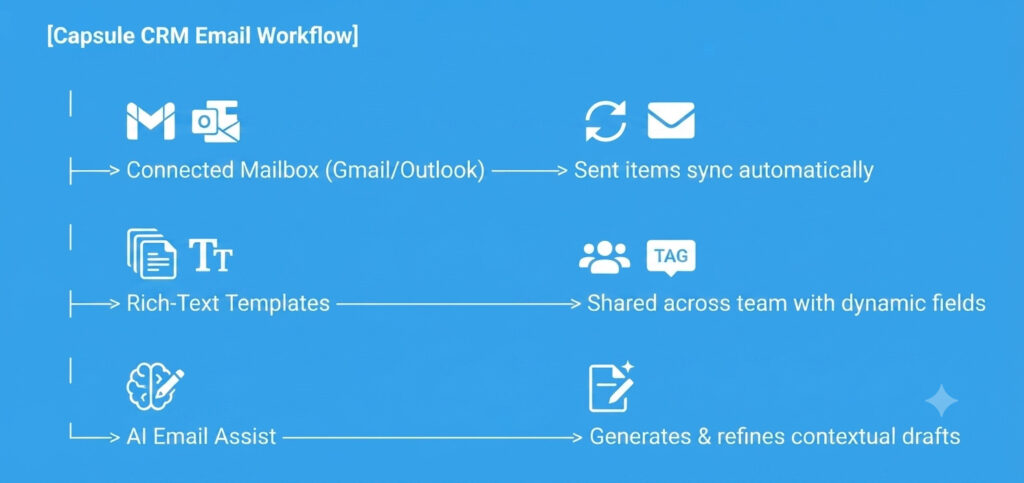
Capsule features an integrated AI Email Assist tool directly within the composer window to assist you in writing mails. By simply prompting the built-in assistant with what you want to say and choosing a desired tone, the AI instantly generates a relevant email draft.
Also Read: odoo vs ZOHO CRM: What You Didn’t Knew Till Now?
Reporting & Analytics
Sales Reports and Pipeline Reports
Making decisions based on instinct can be risky for a growing business. Capsule provides clear, out-of-the-box sales reports that track exactly how much revenue you are generating and help you understand your conversion rates over 30, 90, or 365 days. By reviewing won and lost opportunities, you can quickly identify the common reasons why sales leads fall through to plan your changes accordingly.
Team Performance and Custom Dashboards
To keep everyone accountable, Capsule offers team performance tracking that allows managers to break down sales and task activity metrics by individual owners or specific departments. You can easily monitor how many deals each rep has created, their individual conversion rates, and who is meeting their targets. This helps business owners identify top performers to replicate their success, while pinpointing team members who might need extra support or coaching to close more deals.
Capsule CRM Integrations
While Capsule CRM is a standalone platform for contact and pipeline management, users can also take advantage of integrations to connect with other business tools. By integrating Capsule with your existing tech stack, you can eliminate manual data entry, streamline financial tracking, and automate marketing workflows.
Currently Capsule CRM’s key integrations are grouped into 20+ categories to help you build a unified business ecosystem. Let’s walk through some of them.
Also Read: Pipedrive CRM VS Capsule CRM: Features, Pricing & Winner
Productivity
Google Workspace: Google Workspace integration links your Gmail inbox directly to Capsule. You can sync calendar events, log email conversations directly to a contact’s timeline, and use a dedicated Google Workspace add-on to view CRM profiles right from your inbox.
Microsoft 365: Much like the Google workspace, the Microsoft 365 connection links with Outlook. This allows you to automatically archive emails to Capsule contact cards and sync your Outlook calendar to keep track of meetings and sales calls.
Accounting
Xero: This integration bridges the gap between sales and finance. It allows you to view a contact’s invoice history, outstanding balances, and payment statuses directly within Capsule. You can also generate Xero invoices directly once you have a ‘Won’ sales opportunity.
QuickBooks: Connecting QuickBooks online ensures that contact details are identical across both platforms. When you win a deal, you can instantly push the customer’s details to QuickBooks to generate estimates or invoices without manual re-keying.
Marketing
Mailchimp: Email marketing is the need of the time these days for businesses. With MailChimp integration with Capsule CRM you can manage contact lists, tags, and custom fields. This ensures your email marketing audiences are always up to date.
Transpond: It is built specifically to create responsive emails, automate drip campaigns based on CRM milestones (like a closed deal), and view campaign engagement statistics directly on your contacts’ timelines.
Automation
Zapier: It allows you to build custom automated workflows (“Zaps”) to pass information between Capsule and thousands of other web applications based on specific triggers.
E-commerce
Shopify: This Shopify connection ensures customer and sales data flow smoothly into your CRM. New purchases automatically generate or update customer profiles in Capsule. This logs order values, registers items purchased, and can even trigger automated order fulfillment tasks on your project boards.
Developer Tools
API: For custom software builds, Capsule offers a clean, developer-friendly REST API. This allows technical teams to build custom integrations, extract granular reports, or connect Capsule to proprietary, in-house business software.
Webhooks: Webhooks allow you to receive real-time notifications when specific events happen in Capsule—such as when a new contact is created or an opportunity is updated. This enables instant updates to external databases or internal communication tools like Slack.
Also Read: 10+ ERP Systems List: Top Solutions for Every Business Size
Pros and Cons of Capsule CRM
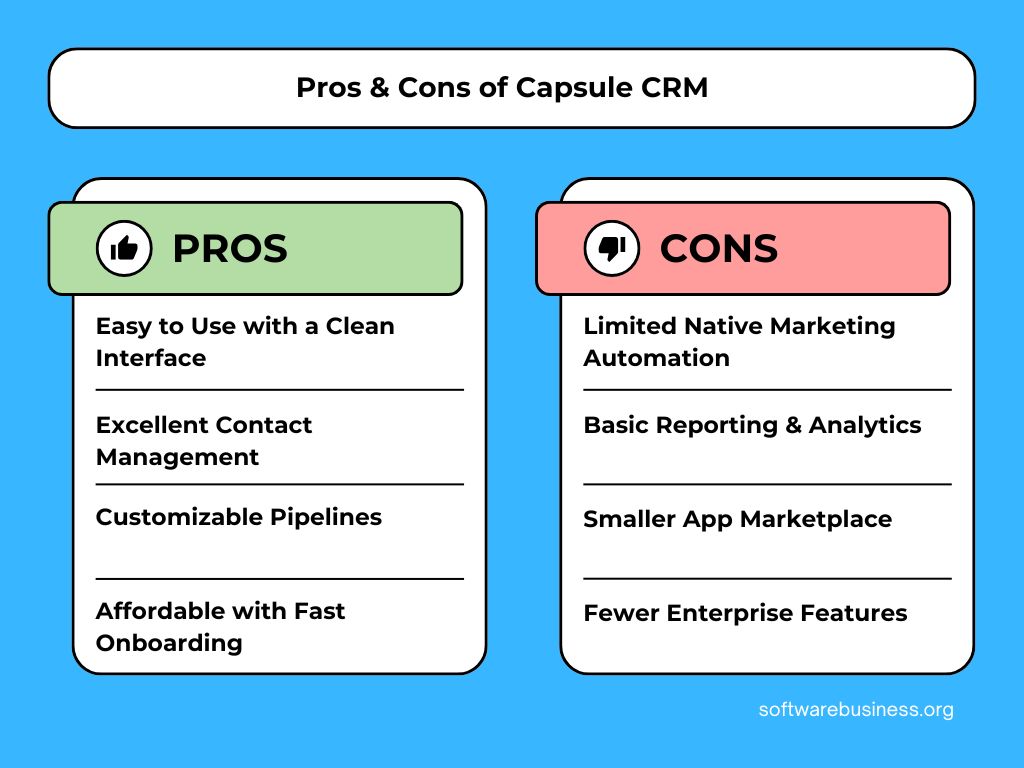
To make an informed software decision, you need a balanced view of where a platform shines and where it hits its natural limitations.
Here is a detailed look at the pros and cons of using Capsule CRM.
The Pros
- Easy to Use with a Clean Interface: Capsule’s user interface is completely devoid of clutter. The learning curve is practically non-existent, allowing even non-technical team members to navigate customer data effortlessly.
- Excellent Contact Management: The platform excels at building relationship timelines. Linking individual people to parent organizations, tagging segments, and maintaining a history of emails and notes gives teams a bulletproof way to manage customer data without dropping details.
- Customizable Pipelines: Instead of forcing you into a rigid sales funnel, Capsule lets you create custom pipelines with custom deal stages that perfectly match your specific business operations.
- Affordable with Fast Onboarding: Starting at a very accessible price point ($18/user/month for the Starter tier), Capsule delivers immense value for small budgets. Because it is designed for speed, you don’t need external IT consultants to deploy it.
The Cons
- Limited Native Marketing Automation: Capsule is strictly a relationship and sales tracker; it does not feature native email marketing blast suites, complex drip campaign builders, or lead-scoring logic.
- Basic Reporting & Analytics: While Capsule provides great level tracking for pipeline stages, teams looking for deep, granular data manipulation or enterprise-grade Business Intelligence (BI) modeling will find the metrics limiting.
- Fewer Enterprise Features: Advanced capabilities commonly found in larger CRM suites—such as custom user roles/permissions on lower tiers, native phone dialers, and complex multi-department security controls—are absent here. It is built for close-knit small teams, not sprawling corporations.
- Smaller App Marketplace: While Capsule connects seamlessly with major heavyweights like Google, Microsoft, Xero, and Quickbooks, its native integration library is significantly smaller than enterprise alternatives like HubSpot or Salesforce.
Who Should Use Capsule CRM?
Choosing the right CRM depends on your team’s size, technical capability, and workflow structure. Because Capsule CRM intentionally avoids complex enterprise features to preserve its clean interface, it is highly suitable for certain business models and a poor fit for others.
Below business types can benefit most from using Capsule CRM.
Small Businesses & Startups
For established small teams (typically 2 to 30 users), Capsule is an ideal step up from chaotic spreadsheets or basic email folders. It provides a reliable center for customer data and sales pipelines without forcing small business owners to spend thousands on external implementation consultants.
Startups often need to move incredibly fast with limited capital. Capsule’s starter plan that starts with $18/user/month, suits small businesses. Furthermore, it is quite fast to onboard to ensure that founders can deploy the system, import their lists, and begin pitching investors or initial clients within a few hours.
Agencies & Consultants
The transition between winning a client and actually beginning to execute the project is usually a struggle. Capsule is uniquely positioned for this workflow because of its integrated project management boards. Once a sales opportunity is marked as won, the team can use Capsule’s custom “Tracks” to trigger standard client onboarding checklists, ensuring clear continuity.
Solo consultants and small advisory need long-term relationships rather than bulk transactional sales. Capsule’s clean timeline allows a consultant to open a profile and instantly remember everything discussed over the past year—including meeting briefs, emails, and shared documents—before jumping onto a renewal call.
Professional Services
Law Firms, Accountants, & Financial Advisors need a high level of client confidentiality, and heavy email communication to operate. Capsule offers deep integrations with Microsoft 365, Google Workspace, Xero, and QuickBooks that allow professional service providers to sync their accounting data and customer communication automatically. This makes it easy to track billable client histories and invoice statuses directly from the CRM profile without jumping between applications.
Sales Teams (SMB and Relationship-Focused)
Capsule is great for small sales teams that prioritize visual pipeline tracking, clear activity logging, and strong mobile access. The drag-and-drop Kanban board-like functionality makes it highly effective for standard B2B account executives moving deals through distinct milestones.
Nonprofits
Donor & Volunteer Management: While Capsule is commercially marketed toward sales pipelines, its underlying structure makes it highly adaptable for small-to-medium nonprofits.
Conclusion
Thinking about every aspect mentioned in this article, if you run a high-volume outbound call center or need deep, native multi-channel marketing automation out of the box, you should bypass Capsule and look toward an all-in-one suite like HubSpot or an activity-heavy pipeline tool like Pipedrive.
However, if your primary business challenges are fragmented customer data, forgotten follow-ups, and a team that rejects overly complicated software, Capsule CRM is a top-tier choice. It provides a reliable, lightning-fast foundation that keeps your business organized, professional, and moving forward without draining your operational budget.
FAQs
Yes. Capsule is excellent for startups needing speed and simplicity. It features a free tier for up to two users and an affordable entry plan. It allows you to organize pipelines and pitch leads immediately without the high costs or long training times of enterprise tools.
Capsule centralizes client information into a single chronological timeline, preventing fragmented communication. It organizes sales pipelines visually, automates follow-up tasks using standardized checklists, and integrates directly with accounting and marketing applications to eliminate double data entry.
Absolutely. Capsule’s free version supports up to 250 contacts, making it perfect for freelancers tracking active clients. Its simple interface saves time on tracking project milestones, and helps you handle client handoffs without requiring advanced technical skills.