Customer communication of small businesses mostly happens on instant messaging rather than email. Clients expect rapid answers to pricing questions, quick status updates, and easy appointment confirmations directly on WhatsApp.
But these sales conversations made via personal mobile devices create severe operational blind spots. Negotiation history gets lost on individual phones, customer’s context gets lost when reps take time off, and sales pipelines fall out of date because no one wants to copy-paste chat transcripts into a database manually.
The WhatsApp integration for Bigin CRM dedicated to small businesses solves this fragmentation by pulling two-way WhatsApp messaging directly into your CRM workspace making your entire sales pipeline management smooth.
What Is Bigin WhatsApp Integration?
Bigin’s WhatsApp integration links a registered WhatsApp Business Account (via Meta’s Cloud API or supported providers) directly to your CRM dashboard. Instead of switching back and forth between your desktop and phone screen, reps can send, receive, and manage customer messages directly from contact records and pipeline deal cards.
When a new message arrives on the rep’s Whatsapp, Bigin automatically connects it with the matching contact or creates a new lead, whatever is needed. Reps can view important customer details including associated deals, open tasks, purchase history, and custom field values right beside the active conversation window. All of these features help reps to do the needful like responding with full context, trigger approved message templates, share document attachments, and adjust and manage sales pipeline stages without leaving the chat interface.
Every incoming text and outgoing reply logs automatically to the customer’s permanent activity timeline, ensuring full visibility across the entire team.
This integration is very useful for solopreneurs, boutique agencies, consultants, and real estate professionals who are operating in messaging-first markets across Europe, Latin America, Asia, and the Middle East, where WhatsApp is the primary channel for closing deals and retaining clients.
Also Read: Pipedrive CRM VS Capsule CRM: Features, Pricing & Winner
What Can Reps Can Do with Bigin WhatsApp Integration? – Key Features
The Bigin WhatsApp integration is built on Meta’s official WhatsApp Business Platform (API), transforming WhatsApp from a disconnected mobile chat app into a centralized, collaborative sales tool inside your CRM.
1. Shared Inbox for Team & Filter Options
Bigin provides a dedicated WhatsApp module that functions as a shared team inbox.
Inbox Segmentation: Team members can switch between ‘My Chats’ (conversations specifically assigned to them) and ‘All Chats’ (the complete company communication stream) in a single click.
Filtering & Sorting: Another useful feature is that reps can quickly filter conversations by date, status, or assigned team member to locate high-priority discussions without scrolling endlessly.
2. Two-Way Messaging & Direct Launchers
Reps can read, send, and receive WhatsApp messages directly within the Bigin desktop or web browser dashboard.
Direct Record Launching: Reps can initiate a WhatsApp chat from an individual contact card or the deal card without navigating to the inbox. This can be done with a single click directly from any individual Contact record or Deal card.
3. Quick View Side Panel
To avoid missing contexts or any other details the chat interface with WhatsApp integration features a panel at the right that displays the contact’s full commercial profile in real time. The panel shows details like:
- Associated pipeline deals, current stages, and deal values.
- Recent activity timelines, past customer notes, and upcoming tasks.
- Quick-action shortcuts allowing reps to log a call, create a follow-up task, or advance a deal stage without leaving the chat window.
4. Automated Chat assigning & Lead Assignment
If any deal or lead remains idle for more than a usual time, the system automatically flashes or notifies the rep to make an action for updated status. Also, rules automatically distribute new incoming chats among available team members (e.g., via round-robin or defined criteria).
If a rep goes on leave or is overwhelmed, conversations can be reassigned to another team member with full chat history intact.
5. Pre-Approved Interactive Message Templates
To initiate outbound conversations outside WhatsApp’s standard 24-hour service window, businesses can deploy pre-approved WhatsApp templates:
Dynamic merge fields automatically pull contact names, invoice numbers, and meeting times from CRM records.
Templates support interactive buttons (e.g., “Confirm Booking,” “View Invoice,” or “Speak to Agent”) for frictionless customer interaction.
6. Quick Replies
Reps can save time and instantly trigger pre-written responses for recurring questions like pricing FAQs, bank details, or office directions.
This standardizes messaging quality across the team and reduces first-response times.
7. Event Led Workflow Automation for Deals
WhatsApp connects directly into Bigin’s workflow to enable stage-based messaging triggers such as.
- It can automatically send an order confirmation or delivery update when a deal reaches a specific milestone.
- Triggering an automated thank-you note and review request the moment a deal is dragged into Closed-Won.
- Dispatch payment links or intake forms based on pipeline movements.
8. Role-Based Custom Permissions
The admins can maintain complete control over operational governance like assigning particular permissions per user or profile. For example, admin can designate junior staff with View Only access to read transcripts for context, while senior sales reps can be granted with ‘View and Reply’ authority to engage prospects directly.
9. WhatsApp Chats Without Sharing Personal Numbers
WhatsApp messaging functionality extends natively to the Bigin iOS and Android mobile apps. Field reps can manage company WhatsApp communications on their personal smartphones without exposing personal phone numbers or losing conversation history.
Explore Other Alternatives for Bigin CRM
How to Connect WhatsApp Business to your Bigin Dashboard?
To start integrating your WhatsApp Business with Bigin dashboard, just follow below simple steps.
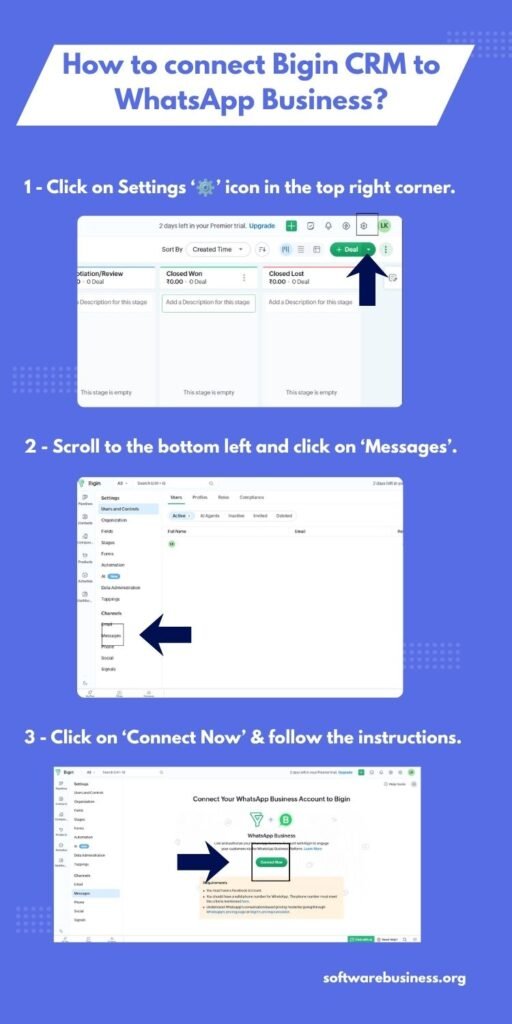
- Login to your Bigin CRM dashboard.
- Click settings symbole ‘⚙️’ in the right side of top bar.
- Then in the left sidebar scroll to the bottom of the page. Then Select ‘Messages’.
- You will see a button in the center of the screen to connect your whatsapp to the Bigin CRM.
- After Clicking on ‘Connect Now’, you will be redirected to the Facebook login window where you need to input your login credentials.
- Select your linked Facebook Business Account and the corresponding WhatsApp Business Account.
- Follow the on-screen prompts to configure your display name, register/verify your business phone number, and assign user permissions.
Also Read: 6 Features in Pipedrive Email Tracking That Keeps Every Sales Interaction Organised
How the WhatsApp Integration Helps Small Businesses?
For solopreneurs, lean sales teams, and boutique agencies, this integration addresses the most common operational bottlenecks of modern messaging:
1. Avoids personal phone use liability
Connecting an official WhatsApp Business Account to Bigin ensures the business owns and preserves every customer interaction inside a permanent CRM record.
Many small businesses make their sales reps use their personal phone numbers to chat with customers. If an employee leaves the company, customer relationships, chat histories, and open negotiations also get affected.
2. Offers a 98% Open Rate
Sending emails like the traditional way suffers from low open rate (often averaging 15–25%) and even many mail lands in spam filters.
WhatsApp boasts an average 98% open rate, with most messages read within minutes.
3. Eliminates Repetitive Manual Copy-Pasting
Without this integration, reps have to waste hours copy-pasting quotes and contexts from desktops to mobile phones, or taking screenshots of chats to paste into CRM notes.
Bigin automates this entirely and logs conversations automatically into the CRM with quotes and invoices can be pushed directly into chats
4. Provides Instant Context
When a client reaches out on WhatsApp, reps can immediately know who they are, which deal they are negotiating on, what products they inquired about, and what was discussed on past calls. And that’s all too through a panel while having conversation. Small businesses can deliver the rapid, personalized service expected of a boutique firm without having to dig through old files.
Conclusion
Integrating WhatsApp with Bigin CRM represents an important operational upgrade for modern small businesses. By moving conversations from personal smartphones and into a shared, centralized workspace, you eliminate scattered records, protect company data, and ensure every team member operates with complete customer context.