
In sales, time is the real money. You let the client wait even a day, and you will see the client is gone to your competitor. Letting fresh inquiries rot in an unorganized inbox is the fastest way to kill revenue. Usually fresh marketing leads mix directly with high-value, near-closing deals inside a standard pipeline which makes your data completely bloated and complex to work through. Sales people sometimes face a blackout buried in administrative chaos and paralyzed when deciding who to call next.
Pipedrive addresses this specific business hurdle through its dedicated lead management software. By keeping unverified, top-of-funnel leads separate from active ones, the platform ensures your sales people qualify leads efficiently and protect pipeline forecasting accuracy from day one. Pipedrive CRM is one of the best CRM for sales people who want to reduce time wasting extra work like data entry the excel with updates. They can use that time to engage with more clients.
What is Pipedrive Lead Management?
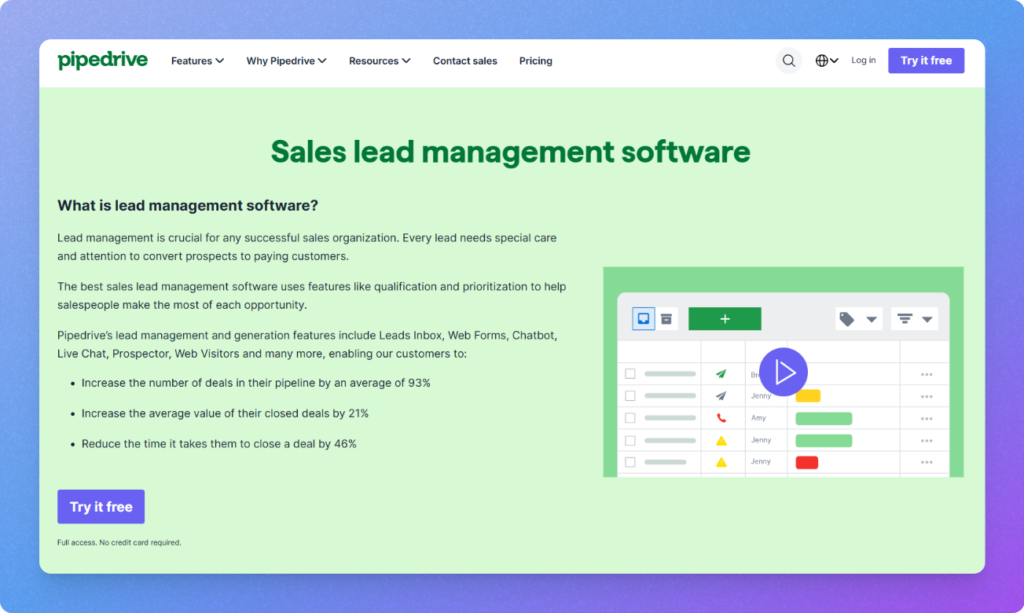
Pipedrive Lead Management is a dedicated framework or a feature designed by PipeDrive to capture, qualify, and organize potential buyers before they enter your primary sales pipeline. Instead of cluttering your active dashboard with unverified leads, the system acts as a strategic gatekeeper to keep your sales focus sharp.
There are 4 basic terminologies that are used to track the whole lead management process.
- Lead Inbox: It is a separate triage area where all new fresh incoming inquiries are collected. This keeps cold marketing web leads isolated from those with which you are currently active in negotiations.
- Deals: The starting point of a lead once it gets qualified by salesperson. In this stage, leads are converted into visual “deal cards” and moved into your primary Kanban style pipeline for active selling.
- Activities: It denotes the physical actions or any progress made in a particular lead like phone calls, meetings, or follow-up emails performed to ensure continuous momentum.
- Automation: The background engine that handles repetitive tasks, such as instantly routing a new webform leads to a specific salesperson.
Through this framework, the platform ensures your team spends less time digging through emails and more time working on high-value interactions. It provides a clean, entry-level workspace that transforms chaotic public inquiries into a structured, revenue-driving process.
Why Do Businesses Need Better Lead Management?
Scaling a business is nearly impossible without a structured process to manage incoming inquiries. Teams usually rely on basic emails and mental notes to track potential buyers which results in immediate operational friction.
A Salesforce study says, salespeople spend less then 30% of their doing actual selling work. Most of the time they are just copy pasting excel data to make unwanted randon spreadsheets, writing emails that can be automated and etc.
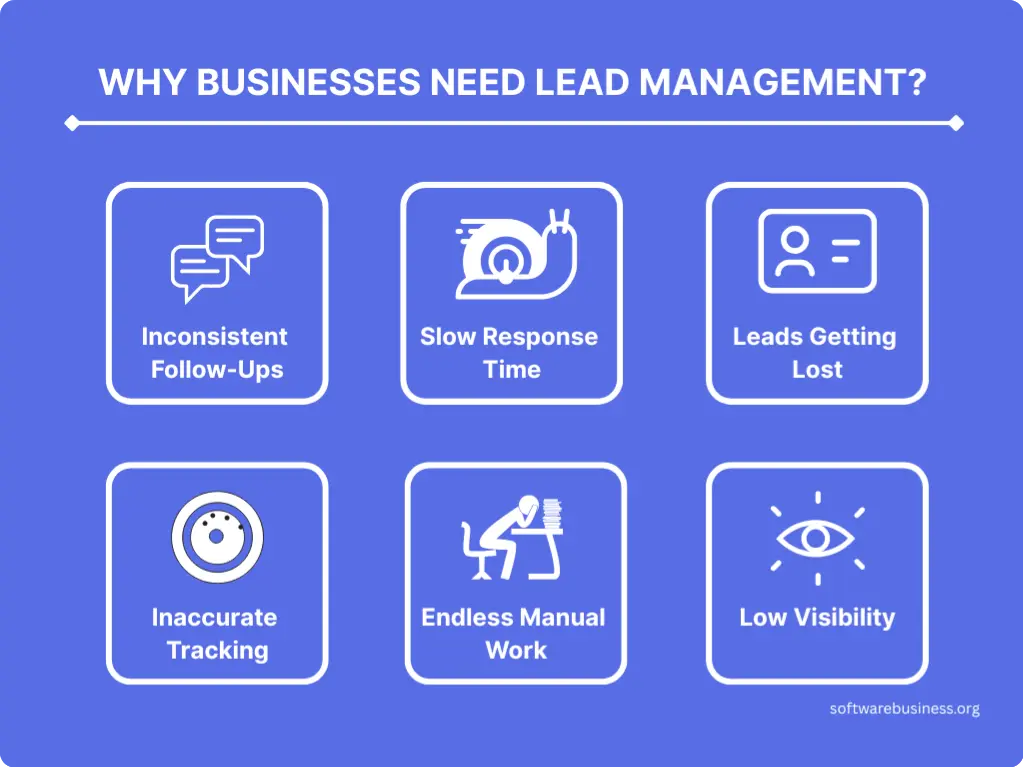
If your organisation lacks a dedicated lead management system, it might be a huge chances that your team is also facing these six critical bottlenecks.
Inconsistent Follow-Ups: Sales staff naturally shifts to wards working on whatever deals feel easiest or most recent. Without forced daily tasks, outreach becomes difficult. Clients get a phone call on day one, a random email a week later, and then get ghosted by your sales team.
Slow Response Times: As i mentioned in the beginning, how fast you act on your leads is everything in sales. If an inbound inquiry sits in a generic “info@” corporate inbox for 24 to 48 hours before being assigned to a salesperson. The client has likely already moved on to a competitor who responded within minutes.
Leads Getting Lost: When inquiries are scattered across personal spreadsheets, sticky notes, and individual messaging apps, good revenue opportunities inevitably slip through the cracks. There are no reminders to catch a buyer who requested a quote but got forgotten during a busy work week.
Inaccurate Future Forecasting: Leadership cannot accurately predict future monthly or quarterly revenue when the sales pipeline is filled with unverified data. Mixing dead marketing leads with active buyers hampers your conversion rates, forcing executives to make strategic decisions based on guesswork rather than reality.
Endless Manual Work: Salespeople waste hours every day manually copying and pasting contact information from website forms into spreadsheets, typing out identical introductory emails, and logging calls by hand. This makes them indulge in data entry work instead of actually selling.
Low Visibility: Managers are left completely in the dark regarding individual performance. Without centralized tracking, it is impossible to see which executives are dropping the ball, where prospects are losing interest, or which marketing channels are actually driving real business value.
Also Read: How a CRM integration solves all the Hotel Industry Problems?
How Pipedrive Lead Management Works?
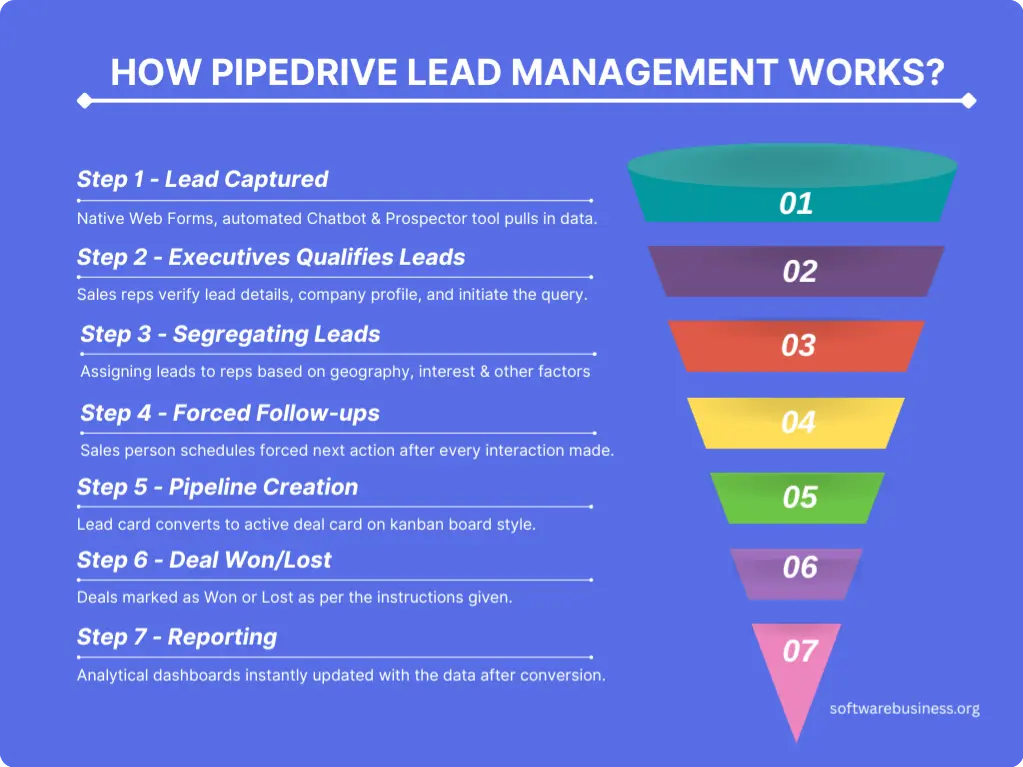
The entire lifecycle inside Pipedrive is engineered to take raw, unverified internet leads and systematically refine it until it becomes a deal or lose deal. Instead of letting inquiries stall, the platform enforces strict, linear actions by the sales team.
Here is the tactical workflow explained in moves from initial touchpoint to final reporting.
1. Lead Capture from various sources
The lifecycle begins the moment an inquiry hits your ecosystem. Pipedrive captures these through native Web Forms embedded on your site, an automated Chatbot that interacts with live traffic, or via the Prospector tool which pulls verified outbound B2B data directly into your dashboard. All inbound emails to your sales aliases are also automatically swept up here.
2. Qualification of Leads by Sales Reps
Once captured, all the enquiries land in the Lead Inbox. This is a standalone triage zone which stays completely separated from your active sales numbers. Reps review here everything like the lead details, company profile, and initial query here. Here, the goal of the reps is simple. To determine if clients have the budget and need before letting them enter up your main workspace.
3. Segregating Leads Based on Internal Factors
As soon as a lead is verified, Pipedrive’s automation engine assigns ownership. Using custom internal workflow rules, you can distribute leads automatically based on geography, product interest, or any other factors among your active front-line reps. This will ensure zero lag time between capture and ownership.
4. Forced Follow-up
Here ownership triggers the activity engine. The assigned rep immediately has to plan a forced next action (e.g., “Call within 15 minutes”). Simultaneously, Pipedrive can kick off an automated email sequence to inform the client. Here they can also track opens and clicks directly inside the lead’s timeline. Also,sales reps gets a notified whenever the client engages with yor emails like opening or clicking any links if using pipedrive’s email tracking and communication feature is used.
5. Pipeline Creation in Kanban Board Style
When the lead explicitly agrees to a discovery call or a formal demo, the sales person clicks “Convert to Deal.” for that particular client. At the very same second, the lead card vanishes from the Lead Inbox and transforms into an active deal card on your primary Kanban board, instantly spawning matching Contact and Organization profiles.
6. Deal Won/Lost
The reps assigned for a particular lead, drags the deal card through customized visuall sales stages until it reaches a final resolution. If the contract is signed, it is marked Won. If the deal falls through, marking it “Lost” will trigger a mandatory popup forcing the rep to select a specific reason (e.g., “Competitor Price”). This data can be better used for capturing critical market feedback.
7. Reporting
The moment a deal closes, your live analytical dashboards are instantly updated with the data. Management can review the entire conversion funnel—evaluating exactly how many raw web captures successfully converted into paying clients, tracking individual rep velocity, and calculating precise revenue forecasts for the coming quarter.
Also Read: odoo vs ZOHO CRM: What You Didn’t Knew Till Now?
Key Features of Pipedrive Lead Management Software
Lead Capture
Pipedrive approaches lead capture not as a passive storage bucket, but as an active filtration system built to ingest, filter, and route multi-channel inquiries without human friction.
Web Forms
Pipedrive’s native web form builder eliminates the need for messy third-party plugins that leak data. It is accessible via the platform’s core lead generation features. These forms are entirely customizable to match your company’s visual identity and appeal. You can drop in specific custom qualifying fields such as company size or service needs and embed the final form directly onto landing pages. The moment a client hits “Submit,” their profile data bypasses external spreadsheets and populates directly into your CRM database as a fresh lead or action item.
Chatbot & Live Chat
To capture website traffic that prefers immediate interaction over filling out static forms, Pipedrive relies on its automated Chatbot. You can program distinct conversational logic tracks that ask pre-qualifying questions to site visitors 24/7. Based on their responses, the bot can share data sheets or use a scheduling link to let qualified buyers book a meeting on a rep’s calendar. If a visitor matches high-intent criteria, the system allows human reps to intercept the conversation via Live Chat, picking up the exact context gathered by the bot to close the qualification gap in real time.
Messaging Inbox
Modern lead capture extends far beyond website traffic to direct social and messaging channels as well. Pipedrive solves this fragmentation with a centralized Messaging Inbox that integrates directly with major social networks like WhatsApp for Business, Facebook Messenger, and Link extensions. Instead of forcing reps to toggle between different phone apps and browser tabs, all incoming direct messages flow into a unified feed. Reps can chat with prospects, map the conversations directly to a central contact profile, and ensure no social inquiry is dropped.
AI-Powered Prospector & Intelligence
When inbound traffic is slow, Pipedrive shifts from passive capture to active, outbound generation. Using the Prospector tool, sales teams can search an extensive B2B database to find high-quality leads that match their ideal customer profile (ICP), pulling verified emails, direct phone numbers, and job titles straight into the CRM. Additionally, the platform uses machine learning algorithms to offer smart, automatic data enhancement instantly scouring public records and web data to fill in missing corporate details the moment a lead is created.
Also Read: What is Zoho CRM Goals? How Can You Master It?
Lead Qualification
Once your multi-channel lead capturing system is running, the next important step is to filter all those leads. Pipedrive ensures that your main sales pipeline remains hyper-focused by providing a dedicated environment where raw prospects are systematically evaluated against your ideal customer profile (ICP).
By using these five core qualification features, you can thoroughly vet prospects before they impact your pipeline metrics:
Lead Inbox
This serves as your dedicated pre-pipeline staging area, to keep unverified forms submissions, chat transcripts, and cold imports here. This is done to keep your active sales pipeline clean, and not hamper your sales velocity. It also helps in forecasting data from being skewed by cold or unresponsive accounts.
Labels
Visual, color-coded tags allow reps to categorize incoming leads at a single glance. You can customize these labels based on potential to get convert (e.g., Hot, Warm, Cold), source, or deal type. It gives your team immediate context on how to prioritize their daily outreach.
Filters
To prevent reps from experiencing cognitive overload, Pipedrive’s filtering engine allows users to slice the Lead Inbox by custom criteria. You can instantly organize your view by creation date, assigned owner, label, or specific geographic location, ensuring no high-priority lead is left buried.
Custom Fields
Every business has unique qualification criteria. Pipedrive allows you to build custom text fields, dropdowns, or monetary metrics (such as “Current Software Stack” or “Estimated Budget”) right inside the lead profile. Due to this feature, sales representatives can gather the exact data points required to justify a pipeline conversion.
Lead Scoring
Pipedrive uses machine-learning capabilities to assign numerical values or status rankings to prospects based on their engagement level and profile fit. By automatically tracking web activity and profile completeness, the system highlights your highest-value prospects so your team can engage them first.
How does this feature help your sales team?
Implementing this structured qualification layer changes the dynamics of your sales floor. Instead of wasting valuable hours chasing low-intent clicks or dialing out-of-market phone numbers, your sales team focuses 100% of their energy on highly qualified opportunities.
How Sales Teams Benefit?
The true value of a structured lead management system is it is not just an administrative tool; it is a system of efficiency tailored to your specific role.
Sales Representatives
Front-line reps frequently lose hours managing cluttered software that can be automated with more accuracy. Pipedrive turns the daily grind into a highly organized, low-friction sales process.
Save times for more important tasks: Because tools like web forms and the messaging inbox automatically map incoming customer profiles directly to the CRM database. Reps spend their energy talking to buyers rather than manually copying and pasting contact rows.
Priorities mentioned: By using visual labels, smart filters, and numerical lead scoring, reps never have to guess who to contact first. They open their dashboard and instantly see their highest-value, hottest opportunities waiting at the top of the pile.
Faster Follow-ups: Immediate notifications and automated next-action activities ensure that speed-to-lead is maintained. Reps can pick up a live chat or fire off a pre-built email sequence within minutes of an inquiry hitting the system.
Sales Managers
For leadership, managing a sales floor without centralized lead tracking is like running blind. To manage all the sales activities, Pipedrive offers complete operational transparency with its visual focused CRM software.
Total Visibility: Managers can have an accurate view of the entire top-of-funnel intake. You can easily track exactly which marketing sources are driving volume and how efficiently those raw leads are converting into active pipelines.
Targeted Coaching: Because every email, phone call log, and live chat transcript is tied directly to a central profile timeline, managers can pinpoint precisely where a rep’s deal mechanics are failing and provide data-backed guidance.
Accurate Forecasting: By segregating unverified, cold marketing traffic inside the Lead Inbox, managers protect their core pipeline numbers from inflation which leads to highly dependable, realistic revenue predictions.
Performance Tracking: Leadership can continuously monitor key productivity indicators such as average response times, lead-to-deal conversion rates, and mandatory deal loss reasons to reward top performers and address team bottlenecks early.
Business Owners
Pipedrive translates daily sales activities into long-term enterprise value and structural stability for business owners.
Accelerated Revenue Growth: Eliminating dropped leads, maximizing speed-to-lead, and ensuring consistent follow-up sequences across the entire department naturally yields higher conversion rates and top-line expansion.
Standardized Sales Processes: The platform takes the guesswork out of business growth by transforming sales from an unpredictable forecast into a repeatable, institutionalized assembly line.
True Scalability: A centralized system makes onboarding new sales reps frictionless. Instead of inheriting a ton of spreadsheets, new hires step directly into a functioning framework with built-in automation, routing, and clear operational guardrails.
Also Read: List of All ERP Systems: Top Solutions for Every Business Size
Pipedrive Lead Management Use Cases
Each industry has its own operational bottlenecks when handling incoming inquiries. Pipedrive’s flexible lead management architecture allows organizations to tailor their top-of-funnel workflows to match their specific sales cycles, buyer personas, and compliance frameworks.
SaaS (Software as a Service)
In the software space, lead management is defined by extreme volume and the race for rapid product adoption. SaaS companies rely heavily on Pipedrive’s native web forms, chatbots, and deep API connections to capture sign-ups from free trials or product demos.
The SaaS industry has to work through a massive volume of low-intent sign-ups as well. By benefiting from automated lead scoring, SaaS teams can instantly separate “freemium” looky-loos from high-value enterprise accounts based on corporate email domains, company size, and initial product usage telemetry. High-scoring leads are instantly routed via automated assignment rules to Account Executives for high-touch outbound sequences, while low-scoring users are kept in the Lead Inbox to receive automated, nurturing email flows.
Manufacturing
Unlike high-volume digital sales, manufacturing pipelines feature longer, relationship-driven sales cycles with complex, multi-variable order requirements. For these businesses, inquiries arrive as technical RFPs (Requests for Quotes), custom design blueprints, or inbound specs from trade show networks.
Here manufacturing sales teams can use Pipedrive’s custom fields and labels to tag leads by product lines, raw material requirements, or estimated production volume. Because a single contract can take months to finalize, the Lead Inbox serves as a staging ground where technical sales engineers can track preliminary feasibility discussions, cross-reference supplier timelines, and vet the account’s creditworthiness before moving the project into the active production pipeline.
Agencies & Professional Services
Digital agencies, consulting firms, and creative houses experience highly erratic inbound lead spikes based on marketing campaigns or seasonal corporate budgeting cycles. Their primary challenge is protecting highly paid strategists from wasting billable hours on unqualified discovery calls.
Agencies use Pipedrive’s custom fields to capture important pre qualifiers, such as the prospect’s current monthly ad spend, project timeline, and existing software stack etc. Using smart filters, agency project managers can easily review incoming inquiries and assign them to specialized account teams (e.g., routing a performance marketing lead to the paid media director) only after the prospect has hit a minimum budget threshold.
Financial Services
Wealth management firms, insurance brokerages, and commercial lenders operate under strict regulatory compliance frameworks. For these entities, lead management is less about raw speed and more about meticulous data collection, security, and verification.
Financial teams integrate custom fields to securely log essential client profile details such as risk tolerance, asset size, or financing needs during the initial intake phase. Because regulatory laws require strict data auditing, every single interaction, phone log, and email sequence is tracked permanently on the lead’s timeline.
Also Read: How to Create a Workflow in Business Central & Automate Your Workplace?
Should you integrate PipeDrive’s Lead Management Software for your business?
Choosing the right software architecture comes down to aligning the platform’s native design and framework to match your daily operational realities. Pipedrive’s lead management framework is built specifically for velocity and clear visual execution.
If you are thinking whether Pipedrive is the best option for you or not? Review these specific business scenarios to know if this setup matches your team’s workflow.
You Have a Growing Sales Team
As you bring on new hires, you immediately instruct them and pass fragmented spreadsheets immediately to them. Pipedrive is ideal if you need a system that enforces an institutionalized process. The combination of automated lead assignment, forced next-action activities, and a separate Lead Inbox ensures that new reps can onboard seamlessly and start qualifying prospects immediately.
Your Business Relies on B2B Sales
If your revenue is driven by business-to-business transactions, your sales reps need to track multiple stakeholders, company sizes, and specific qualifying data points before a deal is born. Pipedrive works best in this environment because its data structure natively links individuals and leads to broader Organization and Person profiles.
You Operate as an SMB (Small to Medium-Sized Business)
Enterprise-grade systems often ignore smaller operations under the weight of endless configuration menus, steep learning curves, and monthly software fees. If you run a lean, agile SMB, you need a platform that delivers immediate operational visibility without requiring a full-time IT department to maintain it. Pipedrive offers a lightweight yet incredibly effective infrastructure that balances advanced automation, native web forms, and central messaging channels with a clean interface your team will actually want to use every day.
Conclusion
Hope this guide on lead management software from Pipedrive has informed you well to make you decide how well it fits your business and team. One of the most underrated featured of this immensely sales focused CRM includes PipeDrive AI and its ability to show reports and analytics for better tracking. I will write more on every aspect of Pipedrive including the above features as well.
By implementing Pipedrive’s dedicated lead management architecture, you replace fragmented spreadsheets and cluttered inboxes with an automated, highly efficient qualification machine