Bigin is a lightweight, pipeline-centric customer relationship management platform developed by Zoho. It is built specifically for micro-businesses, solopreneurs, and small teams to reduce the gap between cluttered spreadsheets and complex enterprise sales software.
Small operations frequently make users feel the need for a more improvised solution when deal details get lost, follow-ups slip through the cracks, and customer history is scattered.
What is Bigin CRM?
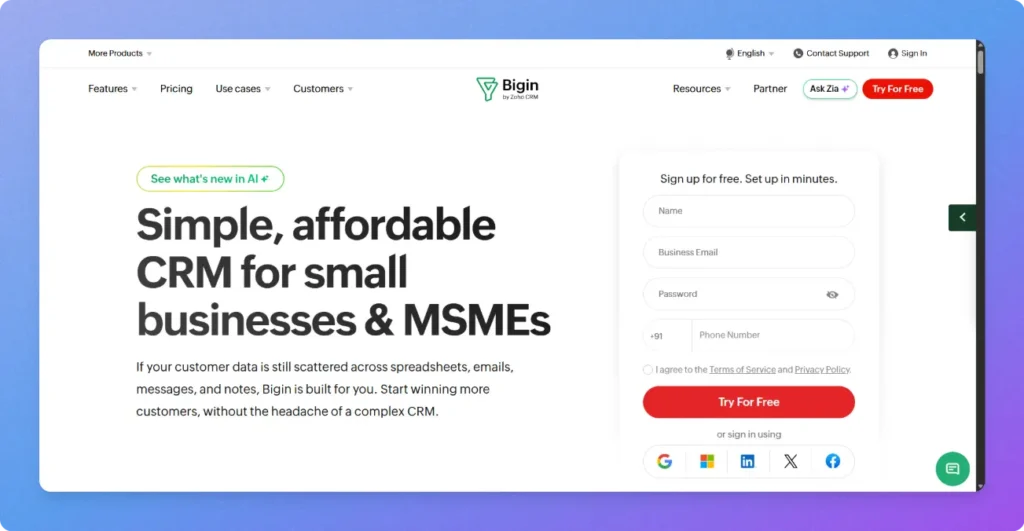
Bigin is one of the newest CRM built focusing the startups, small businesses and freelancers to store contact details, track sales, and manage customer conversations in one place. It is primarily designed for freelancers, service agencies, consultants, and small sales teams.
The Zoho product offers clear pipeline visibility, reliable contact tracking, and fast deployment without the financial or operational overhead of full-suite enterprise platforms.
Traditional CRMs rely on complex databases, steep learning curves, expansive plans and bloated features. Bigin avoids these enterprise overheads, using intuitive visual Kanban pipelines to deliver fast, low-cost setup for small teams.
How Bigin CRM Works?
In Bigin, a lead progresses through a continuous, stage-driven pipeline rather than requiring a manual, multi-screen conversion process. The workflow combines contact creation, deal progression, automated tasks, and post-sale handoff into a single visual track.
Step 1: Lead Capture
The workflow starts when a lead enters the system from any means such as web forms, incoming emails, WhatsApp messages, or telephony integrations.
Bigin automatically creates a unified Contact and an associated Deal in the first pipeline stage (e.g., New Inquiries).
The leads also get source tags (e.g., Google Ads, Referral) to track channel attribution.
Also Read: 7 Step Lead Management Software by Pipedrive Ensures Revenue Growth
Step 2: Auto-Assignment & Initial Qualification
Workflow automation routes the inquiry to ensure immediate follow-up:
Bigin distributes the lead based on defined conditions (e.g., round-robin between reps or routing by territory/deal size).
Instant Outreach: After lead is assigned, an automated confirmation email or WhatsApp greeting is fired instantly with a meeting booking link to the details submitted by potential client.
Task Generation: A task is also scheduled automatically for the assigned rep: as “Conduct qualification call within 2 hours.” to proceed with the lead.
Step 3: Discovery & Stage Progression
As the sales rep engages with the client, they drag the deal card across custom kanban styled pipeline stages.
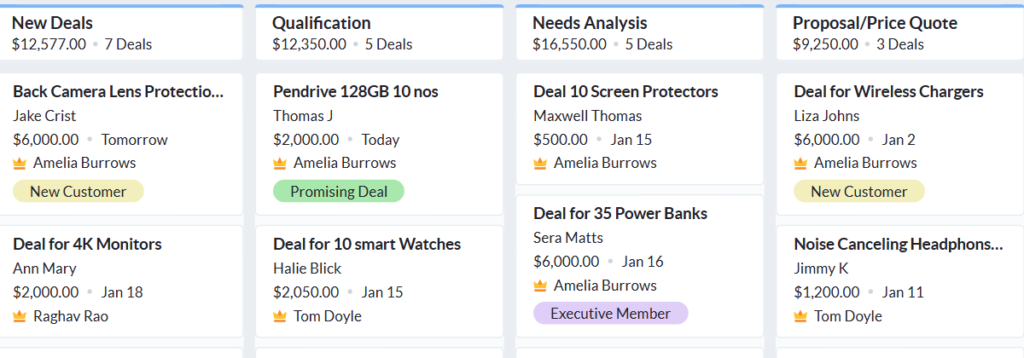
Unified Timeline: Every call recording, two-way email exchanges, and WhatsApp thread logs are connected to the contact for better analysing.
Stage Transition Rules: You can set mandatory checkpoints before a deal proceeds towards conversion (e.g., requiring the rep to enter an estimated deal value and target closing date before moving to Proposal Sent).
Followup Alerts: If a deal remains in Proposal Sent status for more than 5 days without activity, Bigin triggers an automated reminder for the rep to follow up.
Step 4: Deal Closure & Conversion
When the client accepts your proposal and terms, the rep moves the deal to Closed/Won.
Payment Collection: When any client makes a payment, Bigin can automatically generate and send an invoice link (via Zoho Books/Invoice or payment add-ons).
Data Lock: This feature makes the closed deals restricted from further edits to maintain historical reporting integrity.
Step 5: Post-Conversion Handoff (Connected Pipelines)
As other legacy CRMs ends the sales pipeline after conversion, Bigin uses Connected Pipelines to bridge sales and execution:
Marking a deal Closed-Won automatically spins off a new card in the Customer Onboarding or Service Delivery pipeline.
Ownership shifts automatically from the sales rep to an account manager or project lead, with kickoff tasks and welcome kits generated immediately.
Key Features of Bigin CRM by Zoho
Pipeline Management to Monitor Sales Deeply
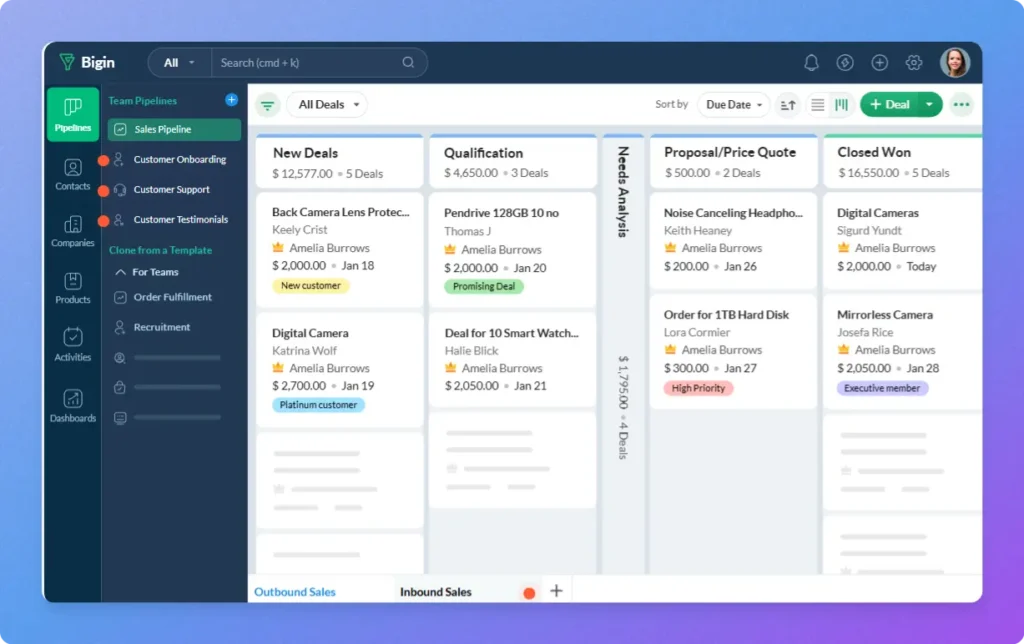
Bigin’s pipeline management provides a visual, stage-based workspace just like a kanban board to track operations. It helps small teams organize deals, monitor customer journeys, and coordinate tasks across different departments with clear visibility.
- Team Pipelines – It unifies all department functional workflows beyond standard sales, such as customer onboarding, service delivery, or support with custom visual stages.
- Connected Pipelines – It automatically moves customer records across pipelines when a sales deal reaches the next stage to eliminate manual data errors.
- External Record Sharing – With this you can securely share live deals or project progress with secure view-only links to clients, freelancers, and external stakeholders.
- Task Management – This feature connects actionable to-do tasks directly to pipeline stages and deal records. The managers can mark an update on the deal to alert follow-ups, schedule calls etc.
- Products – This can build an inventory of offerings with predefined pricing, units, and descriptions. When creating or updating a deal, reps can link specific products directly to the record.
- Product Catalog – It provides a no-code, client-facing showcase of your services or goods that can be shared via direct link. The clients can simply browse, place orders, and make payments online just by using this catalog.
Customer Management to Collect & Process Leads
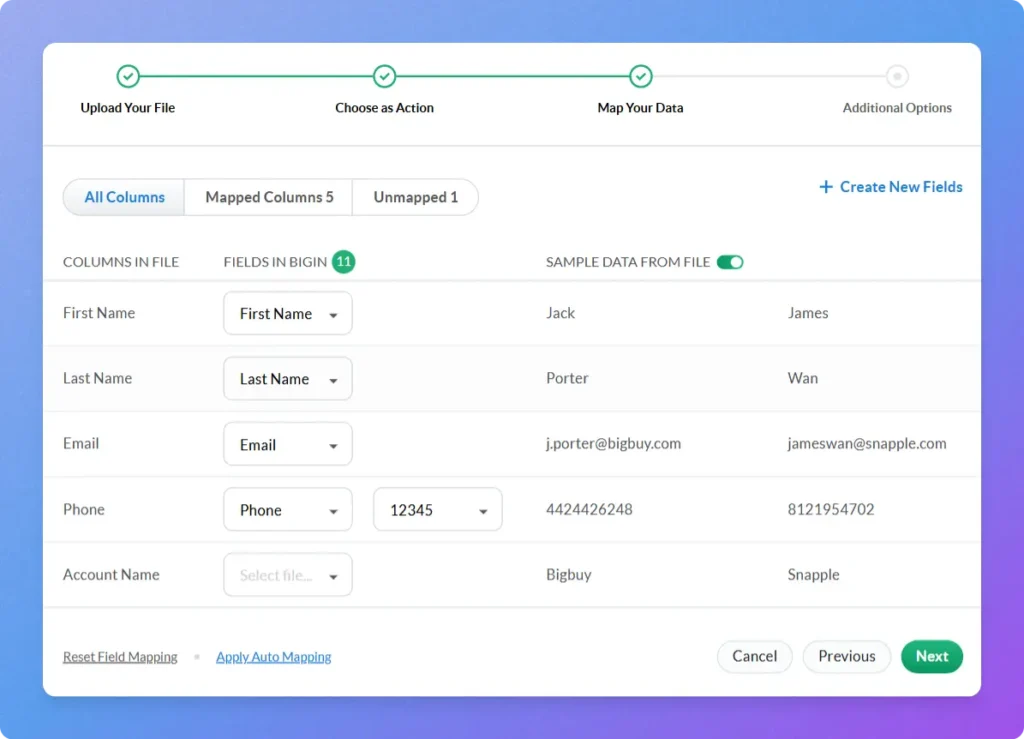
These customer management tools have a powerful ability to centralize contact data, capture inbound leads, and streamline client interactions. It works towards helping small teams to maintain an organized record and engage clients faster without tedious manual data entry.
- Import, Export, Migrate: The user-friendly CRM lets you transfer customer records between spreadsheets and Bigin dashboard effortlessly using file import and export tools.
- Forms: These are easy to create no-code web forms to capture website leads directly into your sales pipelines from any sources.
- Signals (Real-Time Updates): Receive instant desktop and mobile alerts for opened emails, missed calls, and customer interactions.
- Gmail Add-on: This integration helps reps to access, create, and manage Bigin CRM contacts and deals directly inside your Gmail inbox.
- Payment Links: Generate and share secure payment links to collect customer transactions directly from deal records.
- Booking Pages: This helps the businesses to be easily approachable by enabling calendar links for clients to self-schedule meetings.
- Data Enrichment: Automatically populate company and contact records with public social profiles, job titles, and insights.
Multichannel Communication for Better Communication
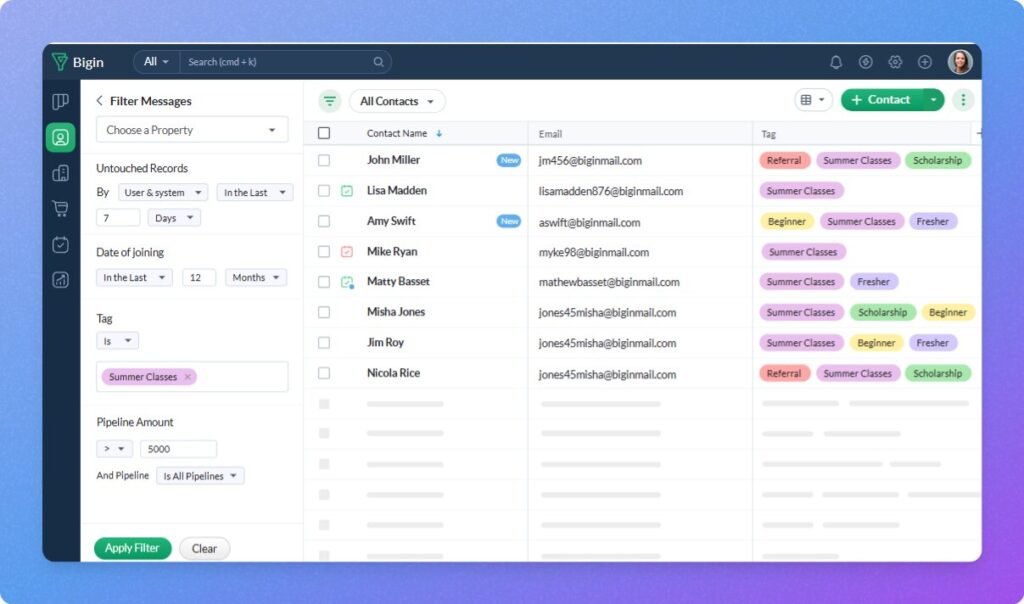
If you are managing multiple communication modes, it will make it difficult to proceed with the deals. It consolidates phone calls, emails, messaging, social interactions, and video meetings into unified contact timelines.
- Built-in Telephony: Reps can make, receive, record, and log phone calls directly within contact and deal records.
- WhatsApp Integration: A dedicated integration to reach out customers on WhatsApp directly from Bigin while saving complete conversation histories.
- Email: It syncs inboxes two-way to save conversations and track mail open and click rates.
- Mass Email: Send targeted email broadcast campaigns to segmented lists with detailed delivery analytics.
- X (Previously Twitter): Monitor brand mentions, engage prospects, and manage social messages directly from the CRM.
- Virtual Communication: This can schedule and host Zoom, Microsoft Teams, or Zoho Meeting video calls inside Bigin.
Also Read: 6 Capsule CRM Alternatives for 2026 (Features, Pricing & Free Trials)
Automation to Save Time and Selling More
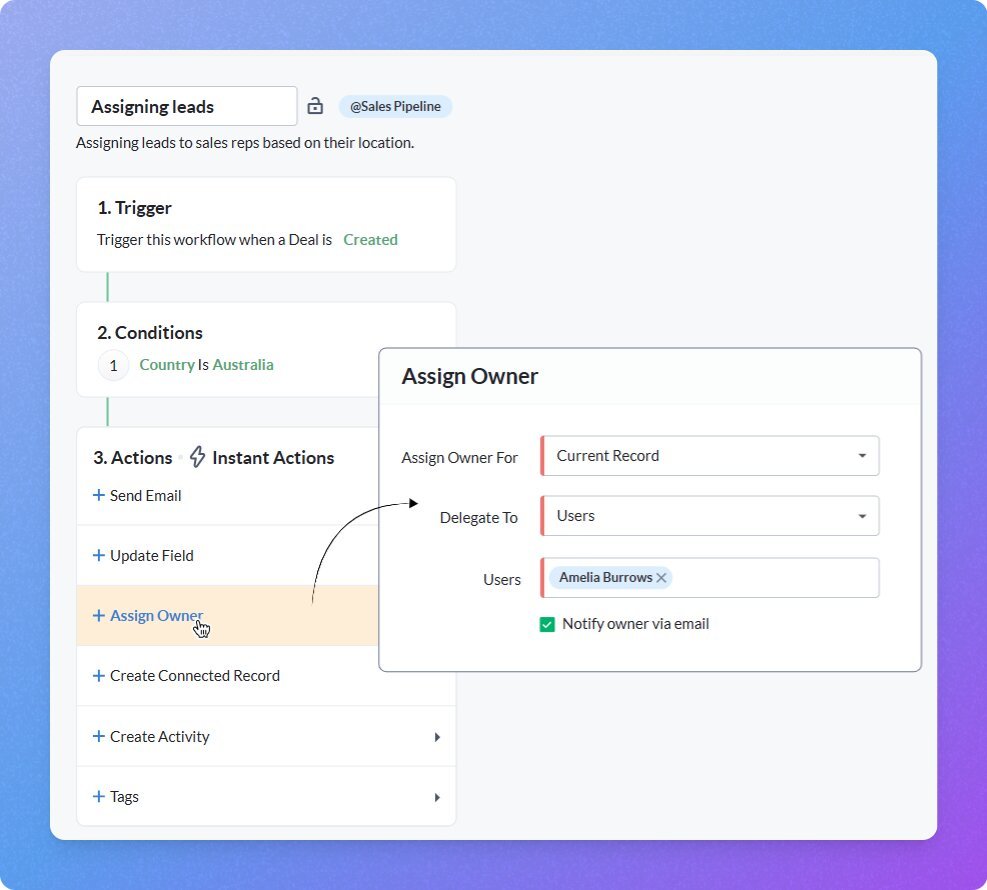
Being one of the most useful features for sales representatives, Bigin’s automation tools eliminate repetitive tasks, reduce human error, and accelerate sales cycles. By triggering automatic task assignments, email notifications, and cross-platform data synchronization based on deal progression the software is capable of achieving all the capabilities.
Workflow Automation: Reps can trigger automatic tasks, email alerts, and field updates when deals reach specific pipeline stages.
Email-In (Topping): It forwards customer emails directly to Bigin for creation and updation of pipeline records automatically.
Marketing Automation: It works on segment leads, track campaign attribution, and automate follow-up outreach to boost lead conversion rates.
Free Invoicing: This feature creates invoices, sends automated payment reminders, and tracks receipts directly via Zoho Invoice integration.
Also Read: 6 Features in Pipedrive Email Tracking That Keeps Every Sales Interaction Organised
AI Features to Take Over Your Routine Tasks
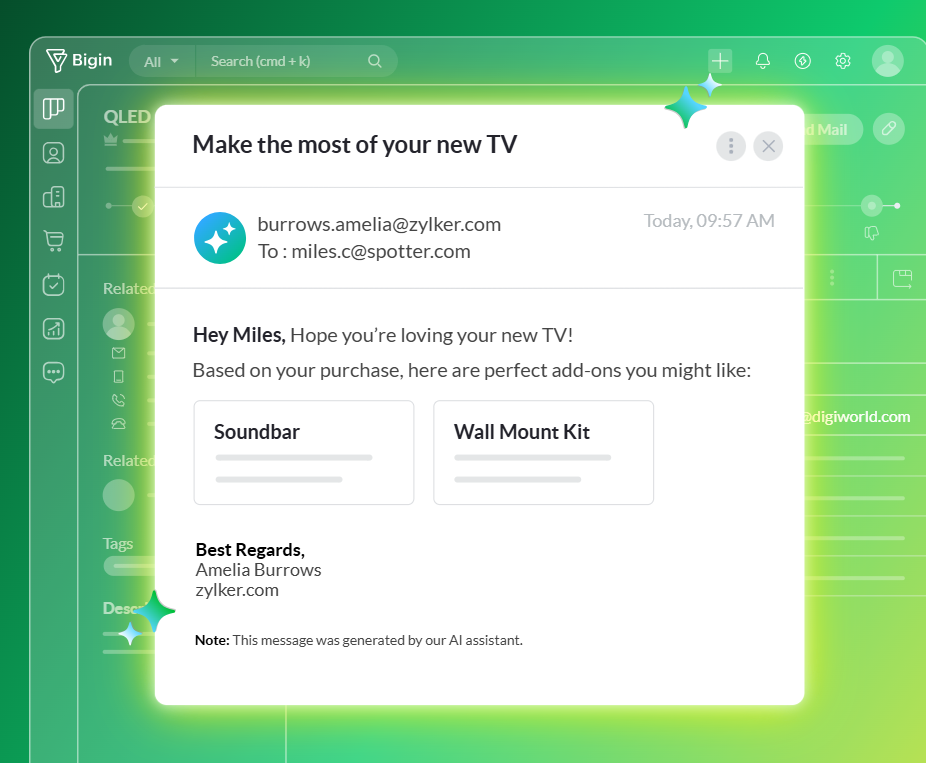
Built-in AI tools in Bigin’s CRM software can automate routine administrative tasks, analyze pipeline health, and summarize customer communication for better scaling.
Zia Agents: It is Zoho’s own autonomous AI agent that manages routine follow-ups, identifies cross-selling opportunities, and diagnoses lost deals.
MCP for Bigin: Connect external AI models like ChatGPT and Claude to query CRM data via prompts.
Email Assistance: The software will assist reps in drafting personalized emails, refine message tone, and summarize long inbox threads using generative AI.
Smart Summaries: To generate instant, one-click overviews of deal records, notes, emails, and active WhatsApp chat histories.
Mobile AI: Access call transcripts, email translation, and smart chat suggestions on iOS and Android devices.
Team Collaboration Keeps Team & Team Members Synced
Bigin’s team collaboration tools keep all teams aligned by centralizing scheduled activities, shared calendars, communication tools, and document repositories.
Activity Management: It can independently track tasks, calls, and meetings while collaborating with teammates via record @mentions and notes.
Calendar View: This enables reps to organize, view, and reschedule daily tasks, calls, and client appointments in a visual calendar.
Team Pipelines: Give sales, service, and onboarding teams shared visibility into distinct customer operational stages.
Microsoft Teams Integration: A useful feature to access, view, and update Bigin customer records directly within Microsoft Teams chats and meetings.
File Cabinet (Topping): Share and request customer files via a single link, organizing documents directly inside Bigin.
Customization to Create Workflows Only for Your Business
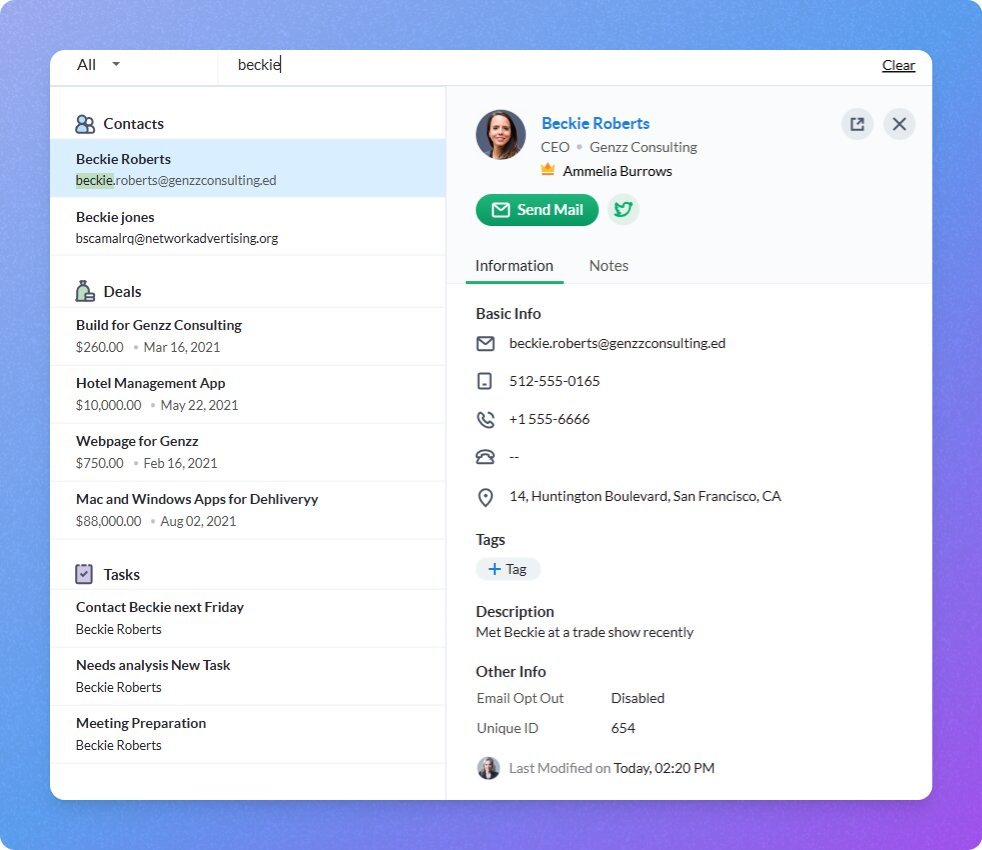
It is a highly customizable CRM that allows small businesses to tailor data layouts, document creation, currencies, and extended functionality.
Fields and Modules: Creating custom data fields by reps is super easy due to this feature. It helps in adapting record layouts to fit your specific business requirements.
Tags and Notes: The color-coded tags helps in better management of records of important conversation details with chronological notes.
Multi-currency: Small businesses dealing or managing deals in foreign currencies get automatic conversions back to your primary home currency.
Toppings: Enable modular add-on features on demand to expand CRM capabilities while maintaining interface simplicity.
Merge Template: Auto-populate client proposals, contracts, and documents using Zoho Writer integration and CRM record data.
Sheet View: Bulk edit, update, and analyze multiple CRM records simultaneously in a spreadsheet-style grid layout.
Analytics to Track Sales & Predict Future Growth
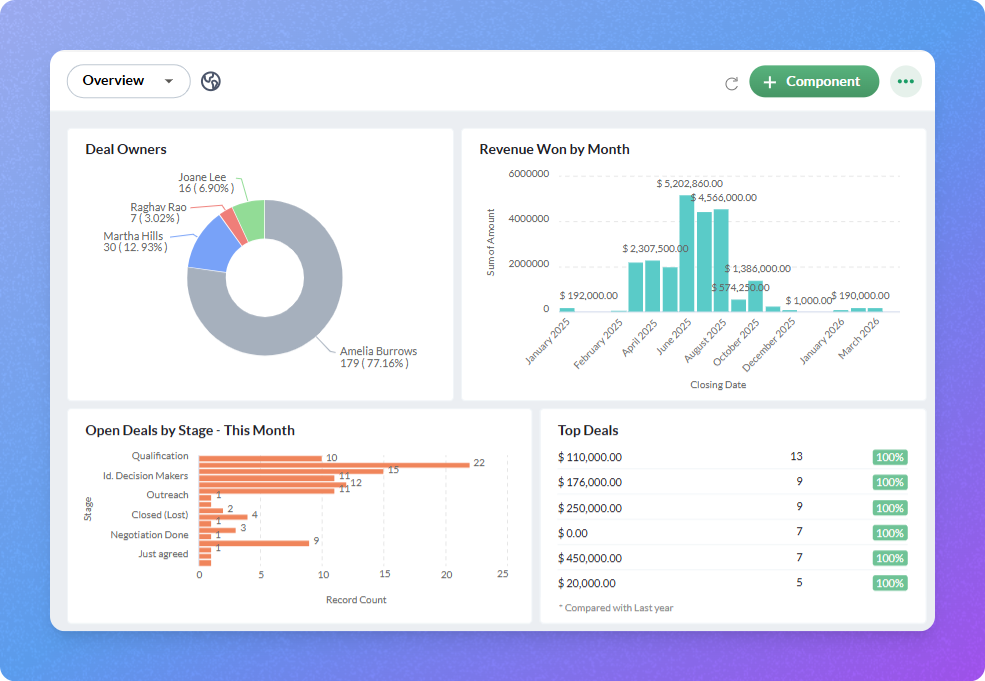
The software is dedicated to small businesses and freelancers, but the high tech analytics provide a deep and clear visibility into your sales pipeline, team productivity, and revenue trends.
Dashboards: Reps can monitor key sales KPIs, deal velocity, and team performance in real time with customizable visual charts.
Zoho Analytics Integration: Using this will unlock advanced business intelligence, predictive forecasting, and cross-functional reporting by syncing CRM data.
Benefits of Bigin CRM
1. Onboarding Takes only 30 Mins – Bigin’s visual Kanban interface mirrors the simplicity of spreadsheets while providing database structure. As small businesses and solopreneurs rarely have the long bandwidth or budget CRM consultations this is a good option for them.
2. Smooth Post-Sale Workflows – Unlike other CRMs, Bigin’s Team Pipelines and Connected Pipelines bridge the gap between sales and project delivery. When a client signs a contract, automated rules immediately spin up a new record in an onboarding, fulfillment, or retainer renewal board, ensuring client deliverables and tasks are never dropped after the sale.
3. Centralized Omnichannel Communication – Losing context is quite common especially in small sales teams and solopreneurs. Bigin integrates two-way email synchronization, built-in cloud telephony, and direct WhatsApp messaging into a single activity feed so everything stays pinned chronologically to that client’s profile for full context.
4. Very Low Total Cost of Ownership – Enterprise CRMs often come up with high seat costs and force users to buy third-party add-ons for essential sales operations. Bigin keeps every operation costs predictable and simply low. A functional free tier works well with built-in tools like free invoicing (via Zoho Invoice) and shareable payment links.
Bigin is not a Suitable Choice for your business if.
Bigin CRM by Zoho is intentionally engineered for micro-businesses and lean teams that need straightforward, pipeline-centric deal tracking. Its lightweight architecture becomes an operational bottleneck when an organization requires deep data architecture, governance, or cross-functional automation.
Large Enterprises
If you are looking to organise a large-scale enterprise which includes large data handling, advance permission roles and cross departmental operations, than you should opt for some advanced CRM software like Pipedrive, Zoho etc.
Also Read: Pipedrive CRM VS Capsule CRM: Features, Pricing & Winner
Businesses Needing Complex Customization
Bigin offers very limited custom fields per module and lacks programmatic logic, unlike Zoho CRM. It also does not feature a developer sandbox, Deluge scripting, custom
Teams Requiring Advanced Marketing Automation
Outreach with Bigin CRM is limited to basic email templates and standard web-to-lead forms. It lacks behavioral triggers, dynamic drip campaigns, and lead scoring models.
Companies Needing Enterprise Reporting & Analytics
Management looking to upscale their native reporting dashboards to standard pipeline velocity, deal stages, and simple activity counts might want to switch attention to other CRM, as Bigin analytics lacks capabilities for cohort retention analysis, AI-driven win/loss probability forecasting, or embedded business intelligence integrations out of the box.
Bigin CRM Use Cases
- Sales Pipeline: Reps can track buyers through qualification, proposals, and closing to gain clear, real-time visibility into deal health and stage progression.
- Customer Onboarding: Complex onboarding process becomes smooth with proper onboarding milestones, live product walkthroughs, implementation checklists, and post-sale setup tasks to ensure long-term retention.
- Customer Testimonials: Identifying satisfied clients, schedule outreach, collect written or video reviews, and track approvals to publish social proof across marketing channels.
- Order Fulfillment: Monitor customer orders from initial placement through packaging, quality checks, and final dispatch across any retail or wholesale business model.
- Website Launch: Coordinate client web projects through discovery, wireframing, development, review, and deployment stages to ensure on-time delivery without missed revisions.
- Press Release: Streamline PR campaigns by organizing media lists, drafting press releases, coordinating journalist outreach, and monitoring distribution deadlines in one pipeline.
- Event Sponsorship: Manage prospective sponsors from initial brainstorming and outreach to proposal negotiation, contract signing, and post-event deliverables for major gatherings.
- Startup Fundraising: Organize venture capital outreach, monitor pitch progress, track term sheet negotiations, and document investor due diligence updates in a structured pipeline.
- Employee Onboarding: Coordinate new hire tasks, documentation, equipment distribution, and company training to help human resources smoothly integrate team members into company culture.
- Product Roadmaps: Organize feature backlogs, prioritize user requests, and track release stages to keep engineering and management aligned on product development milestones.
- IT Requests: Log internal tech support tickets, assign hardware and software issues to IT personnel, and resolve operational bottlenecks with full transparency.
- Customer Support: Centralize client inquiries, assign support tickets to reps, track resolution times, and ensure service level agreements are consistently met.
- Marketing Campaign Management: Oversee marketing campaigns from brainstorming and asset creation to campaign execution, review stages, and performance analysis across channels.
- Content Planner: Organize editorial calendars, track writing and editing stages, schedule social publications, and streamline collateral production across marketing teams.
- Issue Tracker: Capture software bugs, track developer progress across triage and testing stages, and accelerate technical resolutions for smoother product updates.
- Refund Processing: Track customer refund requests, verify return eligibility, coordinate with finance, and process transaction payouts quickly to maintain client goodwill.
- Project Tracker: Plan deliverables, assign milestone deadlines, track team responsibilities, and monitor task completion to deliver operational projects on schedule.
- Reimbursement Claims: Submit, review, audit, and approve employee expense reports and receipts to ensure rapid financial reimbursement and accurate internal accounting.
App Integrations in Bigin CRM
Bigin connects directly with the wider Zoho ecosystem, standard third-party productivity suites, and global telephony providers. This allows small businesses to synchronize operational data and unify customer communication without managing complex custom code.
Zoho Apps
As Bigin CRM is by default compatible to access wider Zoho ecosystem apps like Zoho Books, Zoho Campaigns, Invoice, Analytics etc, it is quite easy for reps to start with this as a suitable choice for managing calls, clients in small businesses, solopreneurs etc.
Third Party Apps
As Bigin CRM is solely for small businesses and solopreneurs, other third party apps like Microsoft Teams, WhatsApp, Zapier, Mailchimp, Quickbooks etc can be used smoothly for better operations.
Telephony Integrations
In addition, Bigin also supports 100+ cloud based telephony vendors to communicate seamlessly with clients without any hardware.
Pricing & Plans
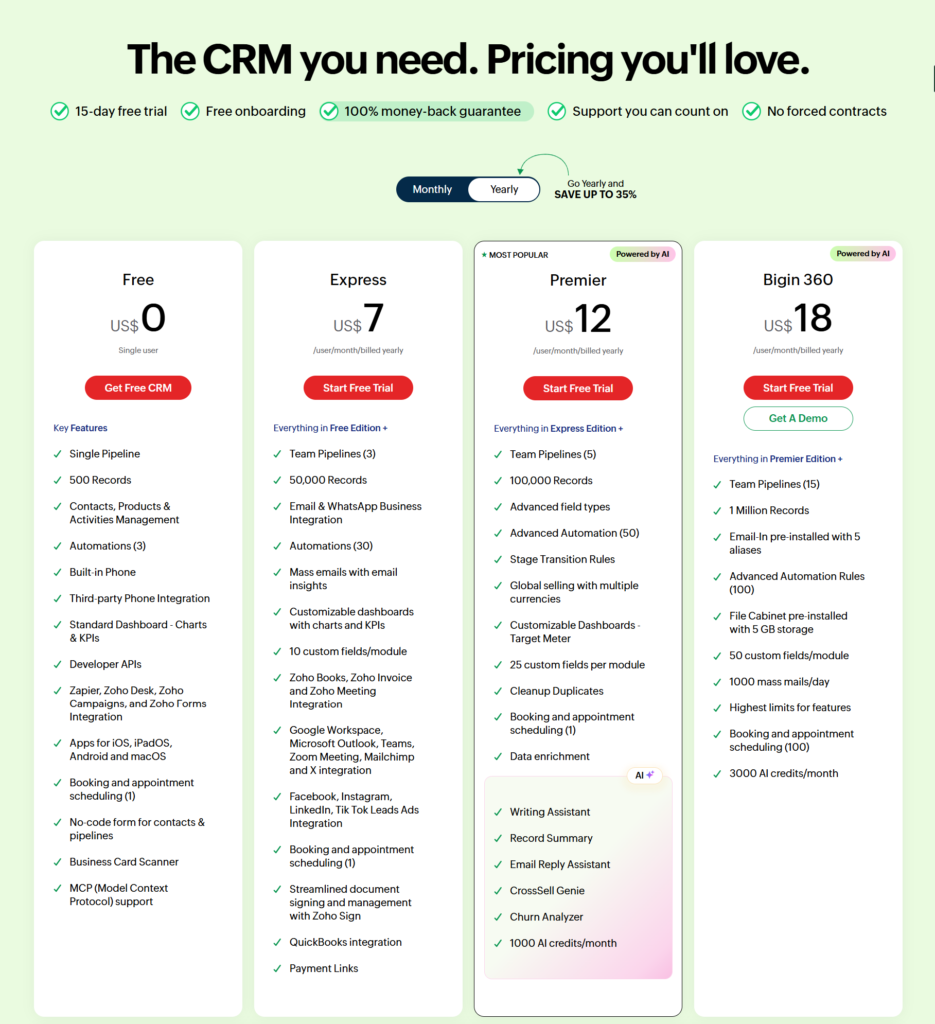
As per my opinion, freelancers and similar professionals should begin with exploring and trying the free tier plan. But, an express plan with $7USD is the best sweet spot initiative.
If you are a solopreneur or any consultant and want to manage inbound sales and post sales execution single-handedly, making multi-pipeline capability essential, Express plan is sufficient for you. But, if you need to engage or manage the onboarding processes, Premier ($12USD) plan is suitable for you.
Growing companies with high transaction volumes, Premier is a good start but if you want to manage a very huge database of contacts, the 100,000 threshold can feel restrictive.
Conclusion
Bigin by Zoho CRM strikes an ideal balance between the ease of spreadsheets and the discipline of a structured sales platform. As other CRM like Pipedrive & Capsule offer advanced and complex interface, Bigin CRM prevents small teams from enterprise clutter, making it an excellent starter CRM unlike for solopreneurs, freelancers, and small service businesses.
Despite being a simple software dedicated to small businesses only, its core operational strength lies in managing both outbound sales and post-sale delivery within connected pipelines, backed by native email sync, WhatsApp messaging, and free invoicing. However, growing teams requiring deep developer customization, multi-touch marketing attribution, or granular security governance can upgrade to Zoho which is the more advanced and enterprise level offering from the makers.