Email marketing is still one of the most underrated modes of marketing for any business. Those email subscribers are the ones who want to interact with you and they are exploring your services or products. This makes businesses take emails seriously.
Sales representatives have to continuously send out tons of customized client pitches each week, still they are forced to walk completely blind. They don’t know if the client opened an attachment or who simply deleted the message unread. Critical follow-up windows pass by entirely forgotten because dates are tracked on personal calendars or written down on loose paper.
Pipedrive removes this communication friction through its native Email Marketing & Sync feature. It turns your standard CRM into a centralized communications hub. Pipedrive automatically mirrors every single outbound pitch and incoming reply directly onto the deal timeline. This deep integration gives your entire team real-time tracking metrics for email opens and link clicks. It also ensures automatic forced next-action follow-up reminders, and grants senior management 100% visibility into historical communications performance right inside the visual pipeline.
Why Email Tracking Still Matters in Modern Sales in 2026?
Despite tons of corporate messaging apps and video conferencing platforms being available, email remains the undisputed primary channel for B2B communications.
A Hubspot study reveals that 87% of buyers prefer to be contacted via email during the buying process. It serves as the official evidence trail for corporate decision-making, contract negotiations, and formal proposals. Because the majority of business transactions occur within the inbox, how a team manages these interactions directly affects their bottom-line success.
In modern sales, several critical factors make systematic email tracking essential.
Response Speed Influences Conversion: A client who receives a tailored response within minutes of an interaction is significantly more likely to convert than one left waiting for days. In modern sales, speed-to-lead and rapid follow-up timing are everything.
Poor Visibility Leads to Lost Opportunities: Without a system to track interactions, reps fly completely blind. They cannot tell if a sent proposal was buried in a spam filter, ignored entirely, or opened multiple times and forwarded to a senior decision-maker forcing them to guess their next move.
Manual Follow-Up Hurts Productivity: Relying on memory or manual scheduling kills a sales floor’s momentum. When reps must manually check their sent folders, write down reminders, and type out individual check-in emails from scratch, they waste hours on non essential work overhead instead of actively selling.
Effective email tracking isn’t about monitoring customers, it’s about helping sales teams communicate at the right time with the right message.
Here’s when Pipedrive email tracking and syncing feature shows its magic.
What Is Pipedrive Email Tracking?
The email tracking technology used by Pipedrive is not a regular IMAP/SMTP setup. It acts as an intelligent communication tracking system that connects your inbox and your sales pipeline. Not only does the Pipedrive CRM software eliminate the need for reps to switch back and forth between various platforms like email client and the CRM platform but allows for an integration of the two worlds into one unified system.
The following are five key features that work simultaneously to track all of your sales communications.
Email Sync: Pipedrive allows you to have full two way email synchronization with Gmail, Microsoft Outlook and other IMAP mail servers. All of the emails being sent and received inside your regular inbox will appear automatically in your CRM, and vice versa, keeping your emails always in sync and organized.
Email Tracking: Right at the time your email is being sent out, Pipedrive adds hidden tracking pixels. Thus, it notifies your sales rep instantly when exactly the recipient has opened it and if they clicked particular URLs such as pricing page or contract links.
Contact Timeline: When you sync conversations they automatically show up on your Contact Timeline. This gives you a history of every interaction your company has had with a person or organization. This way any team member can step in. Know exactly where things stand.
Activity History: Emails are connected to Pipedrive’s activity engine. This means that emails, phone calls, meetings and tasks are all logged together. This creates a record of all sales interactions.
Smart Communication Tracking: The platform uses rules to link incoming emails to the right deal. It does this by looking at the sender’s email address. If there are deals with the same client it sends the email to the most recent deal.
How Email Tracking Works?
When an email reaches your inbox it gets synced into the CRM. Then Pipedrive scans the database to find the sender. Adds the email to the deals Contact Timeline. If a sales rep shares a proposal link ‘Email Tracking’ feature watches what action the receive. The second that link is clicked, a push notification triggers, and the event is permanently logged into the deal’s Activity History.
This system makes sure that every email sent by your team helps move the deal. It gives everyone from sales reps, to managers a view of where the relationship stands.
Pipedrive’s Email Communication Workflow Explained
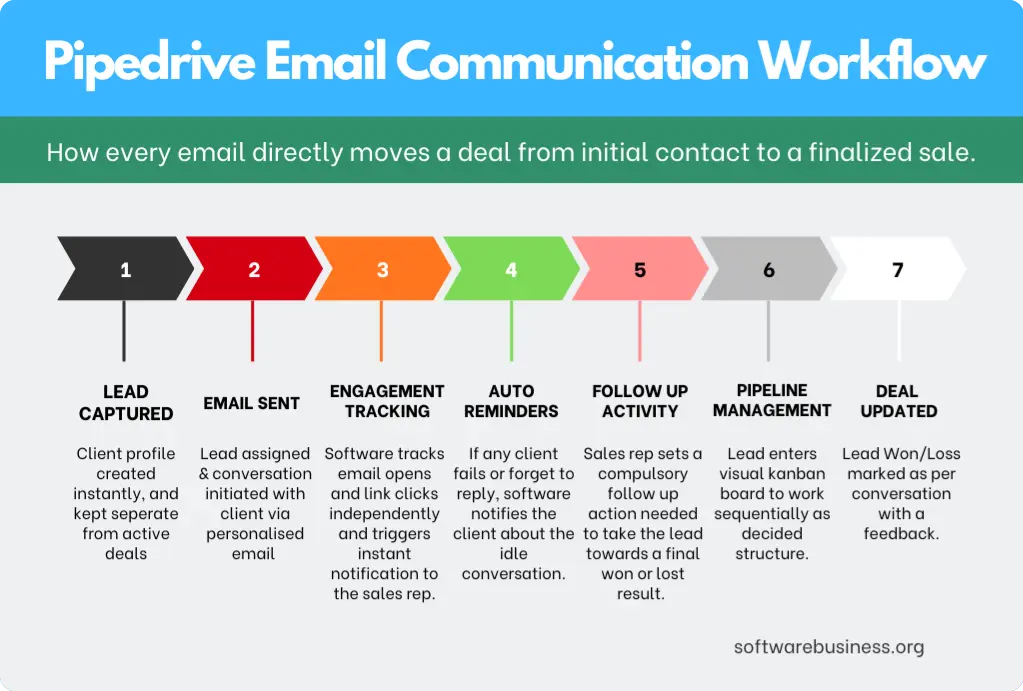
The true advantage of Pipedrive’s email ecosystem is that it morphs your inbox from an isolated text messaging application into an active, automated pipeline driver. Instead of treating communication as a separate task, this structured workflow shows how every outbound and inbound email directly moves a deal from initial contact to a finalized sale.
Lead Captured
The process begins the moment a client enters your ecosystem. Whether they submit a native web form, interact with a website chatbot, or are pulled in via outbound enrichment tools, their profile is instantly created in the Lead Inbox. The pipedrive’s lead management software separates them from your active sales numbers until they are vetted.
Email Sent
Once a sales rep takes ownership of the lead, they initiate contact directly from Pipedrive using pre-built, personalized email templates. Because of the two-way sync, this email is sent through your actual business server (like Gmail or Outlook) but is permanently recorded on the CRM timeline.
Open Tracking
Any moment the client opens the email, Pipedrive’s tracking engine triggers a real-time desktop or mobile push notification to the rep. This provides instant visibility, letting the salesperson know exactly when their pitch has caught the buyer’s eye.
Link Click Tracking
If the email contains specific URLs such as a calendar booking link, a digital brochure, or a formal pricing proposal, Pipedrive alerts the rep the exact second the link is clicked. This high-intent action, signals that the lead is actively evaluating the offer.
Automatic Reminder
If a potential customer opens an email or clicks a link but fails to reply within a specified timeframe (e.g., 48 hours), Pipedrive’s automation engine steps in. It flags the stall point and automatically schedules a pending activity for the owner, ensuring the deal never sits cold.
Follow-up Activity
Guided by the system’s reminder, the rep executes a precise follow-up action. Because they know the prospect already opened the previous email and clicked the pricing link, the rep can tailor their phone call or secondary email to address pricing or scheduling directly to maximize relevancy.
Deal Updated
As the client engages with the follow-up and agrees to a formal evaluation, the rep converts the profile from a raw lead into an active deal. Pipedrive automatically generates matching Organization and Person profiles, linking the entire historical email chain to the new workspace.
Pipeline Progress
At this step, the deal card now enters the visual Kanban board. As the email communication continues towards handling technical objections, sending contract drafts, and setting up meetings, the rep drags the card sequentially through the custom sales stages designed solely for your organisation and sales team like(e.g., “Demo Scheduled,” “Proposal Sent,” “Negotiations”).
Won / Lost
The workflow concludes at the final milestone. If the contract is finalized via email, the deal is marked Won, which then triggers revenue reporting dashboard updates. If negotiations collapse, marking it Lost triggers a mandatory field requiring the rep to input a specific reason, capturing vital market feedback for future outreach.
Also Read: 10+ ERP Systems List: Top Solutions for Every Business Size
Pipedrive’s Email Communication & Tracking Features
Rather than treating communication tools as standalone features, Pipedrive integrates them directly into the sequential steps of your sales workflow. This CRM integration ensures that as a deal progresses, your team has the exact tools required to engage, track, and close prospects without changing software environments.
Contact Management
Your contacts are the fundamental foundation of your entire customer communication process. Every interaction, email, or phone number contains its own distinct business opportunity that requires consistent tracking and structured follow-ups to maximize conversions and close deals.
Pipedrive ease your work here by breaking down contact infrastructure into two separate, logical categories:
- “People” Categories: Individual human clients, buyers, or decision-makers, tracking their unique contact metrics like direct phone numbers and specific email addresses.
- “Organizations” Categories: The parent companies or institutional entities where those individuals work.
Pipedrive’s underlying data architecture relies on three supporting features to round out its communication tracking capabilities:
- Contacts Map: Provides geographic visualization of your database, allowing sales teams to see exactly where their buyers are located for targeted regional outreach or physical field sales trips.
- Contact Timeline: A visual, chronological representation of every historical touchpoint, message exchange, and scheduled interaction across a client’s entire lifecycle.
- File Attachments: The ability to pin critical project documents, contracts, and images directly to a deal card, ensuring sales collateral remains tied to the conversation timeline.
Email Inbox
Because email remains a salesperson’s and clients preferred channel for communication, your CRM needs tools that help you focus on the hottest leads. Pipedrive’s native inbox ecosystem introduces specialized sales features designed to streamline communication workflows.
- Email Sync: This feature links your personal work mailbox to Pipedrive Inbox to keep up-to-date information perfectly mirrored across both tools.
- Email Templates: Reps can speed up their outreach by using ready-made templates or custom layouts that automatically populate with specific data fields right from your CRM contact records. This useful feature saves tons of hours of time to focus on more important things.
Additional High-Impact Communication Features
Beyond the core inbox, Pipedrive uses an advanced array of messaging, scheduling, and documentation features to handle your entire sales lifecycle:
Group Email: Allows sales reps to create targeted email distribution groups, enabling them to send personalized bulk communications to batches of up to 100 contacts simultaneously.
Email Scheduling: Gives you the flexibility to communicate across multiple time zones. Reps can draft their messages ahead of time and schedule them to hit a prospect’s inbox during their local business hours, or use a Smart Email BCC link to track outbound threads without manual interference.
Email Tracking: Provides instant, real-time feedback loops. The system sends immediate notifications the exact second a prospect opens your email or clicks a shared link, signaling high-intent interest.
Meeting Scheduler
Reps and clients usually try to fix meeting times via manual back-and-forth emails wastes valuable energy and risks letting a warm deal cool off. The Scheduler solves this by letting reps book meetings in one take.
Simply set your custom availability windows, generate a link, and invite the prospect to choose a time slot that fits their schedule. The booked slot automatically syncs back to your integrated calendar client. Furthermore, the tool supports native video conferencing integrations, letting you automatically set up video calls for your scheduled meetings via Zoom, Microsoft Teams, or Google Meet.
Call Contacts directly from your CRM
The phone call is often the ultimate moment of truth in sales. Pipedrive’s built-in communication system allows reps to initiate outreach to prospects straight from their CRM dashboard with just a few clicks.
By benefiting from telephonic feature integrations available via the Pipedrive Marketplace, reps can enjoy hands-free calling, take notes, and review customer data fields simultaneously. The system automatically records these interactions as “completed activities” under the associated deal. It also tracks the exact timestamp of the call, and stores call recordings directly inside the deal timeline for future reference or management download.
Smart Docs
Smart Docs acts as a powerful operational add-on designed to automate how your team creates, sends, manages, and signs professional sales documents. It speeds up document preparation and quote creation times significantly.
Using this central toolset, sales teams can handle the following workflows directly inside the CRM infrastructure. It has some cool time saving features reps can use all the time.
- Auto-fill Data: Instantly fill up contracts, quotes, and proposals with existing Pipedrive contact and pricing data.
- Real-time Tracking: Monitor open states to see exactly when a prospect is reviewing your document.
- Electronic Signatures: Collect legally binding eSignatures directly within the document link, removing the need for third-party signing tools.
- Template Sharing: Create master proposal templates and share them across the organization for brand consistency.
- Custom Branding: Remove the Pipedrive logo from external files to deliver a clean, white-labeled experience.
Pipedrive also supports many document modules to ease your work.
- Google Sheets / Google Slides Support: Link templates directly with your Google Workspace to auto-populate files with CRM data, generate trackable sharing links, and request signatures effortlessly.
- PDF Support: Share proposals as secure PDF documents using a public tracking link that flags exactly when a prospect opens the file.
- eSignature Notifications: Stay informed with automated alerts whenever an agreement is electronically signed by your customer.
Also Read: What is Dynamics AX? Currently Known as Microsoft Dynamics 365
How Sales Teams Benefit from Pipedrive Email Tracking?
Now let’s have a look at some practical benefits of using Pipedrive’s email marketing software.
Sales Representatives
- The real-time push notifications for email opens and link clicks
- Centralized communications into a single dashboard reps no longer have to bounce constantly between a separate email client and their CRM.
- The separated Lead Inbox allows reps to examine and qualify cold inquiries based on budget and need before letting them clutter the primary workspace.
- Automated features like Scheduler and automatic activity reminders save hours of tedious administrative work.
Sales Managers
- Pipedrive doesn’t leave team leaders in benefits. Sales managers can also benefit from below useful features.
- Managers have an unfiltered view of the entire sales pipeline including every call and message without having to shadow reps or request manual call logs.
- With complete access to email timelines, templates used, and response metrics, managers can point specific performance bottlenecks.
- Due to compulsory follow up reminders are automated, reps are held directly
- Analytical dashboards update automatically the moment a deal changes status or a communication event occurs. Managers can monitor team-wide activity volume, track individual rep output.
Business Owners
Pipedrive transforms scattered, individual messaging habits into a unified, high-performing corporate asset. By connecting your email ecosystem directly to strategic business metrics, you can confidently steer your enterprise toward sustainable expansion.
- By centralizing your team’s communication history onto one timeline, clients never have to repeat their pain points to different reps.
- Real-time visibility into email opens and document engagement allows your team to move high-intent clients through the funnel before they cool off.
- Owners can clearly see the exact volume of active discussions, allowing for highly accurate cash flow models and reliable operational forecasting.
- Native data synchronization feeds clean, unvarnished communication metrics straight into your executive dashboards.
How to Take Most Benefits of Pipedrive Email Communication?
To maximize the return and take the most benefits on CRM investment, your sales team must move on from treating Pipedrive as a passive address book. They should start using it as an active execution engine. Below are Implementing tips that can transform your communication data into a highly disciplined, high-conversion sales process.
1. Execute High-Intent Actions Instantly
- Respond ASAP: Conversions directly depend on your speed-to-lead response time. When Pipedrive triggers a push notification indicating a cold lead has just engaged with your introductory email, initiate your follow-up sequence within a five-minute window to capture them while attention is at its peak.
- Always Schedule Follow-Ups: Never close a deal window or finish reading an incoming client email without setting your next needed action. The moment an interaction concludes, use Pipedrive’s activity engine to schedule the exact date and time for your next check-in or followup.
- Use ‘Activities’ Instead of Memory: Relying on your memory or loose paper sticky notes is a guarantee for dropped deals. Force your sales team to log every single task, calendar event, and reminder in ‘Activity’ tab inside the platform so the system can automate your daily to-dos.
2. Optimize Content and Strategy
- Use Personalized Templates: While scaling your outreach requires speed, it should never look automated. Build a library of standard templates that can use dynamic merge fields to automatically pull individual names, company details, and specific project pain points directly from your database.
- Avoid Sending Generic Emails: Sending mass, unsegmented bulk email blasts catches spam filters eys and alienates modern buyers. Use Pipedrive’s custom fields and filtering tools to segment your audience by industry, pipeline stage, or past behavior so every message reads like a 1-on-1 personal convo.
- Track Open Rates and Link Engagement: Treat your tracking metrics as a continuous feedback loop. You should audit which email subject lines yield the highest open tracking rates and which proposal links generate the most immediate clicks regularly. Then scale those top-performing templates across the entire team.
3. Maintain Baseline Data Discipline
- Remove inactive contacts routinely: An ideal database is not which have the most number of people. But, with the most active members who are really interested in you. Keeping low quality data actively harms your email deliverability rates. Set a recurring schedule to filter out, archive, or move cold, non-responsive contacts into a long-term marketing nurture stream.
- Document Every Conversation Contextually: Do not rely on your two-way email sync to capture the qualitative nuances of a deal. Immediately after a phone call or meeting, note down concise, actionable internal summary notes directly onto the deal timeline. This will ensure any teammate can step in with complete contextual awareness.
Also Read: How to Deploy Odoo on Hetzner in Under 30 Minutes? (The Easiest Way)
Pros and Cons of Pipedrive Email Tracking & Communication
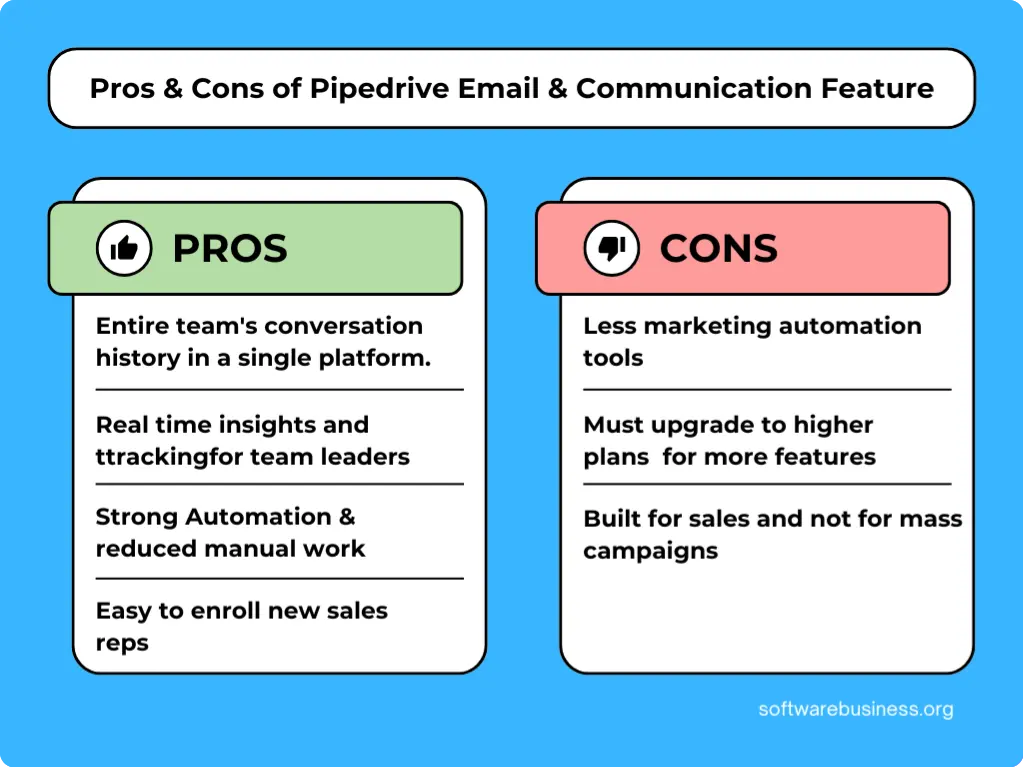
Because no software can be everything to everyone, analyzing both sides of the coin helps ensure it aligns perfectly with your operational model.
Pros
Pipedrive’s communication suite is built from the ground up to optimize individual deal velocity and team efficiency.
Centralised Communication: By keeping your entire team’s conversation history under a single platform, it eliminates data silos. Reps can manage their inbox, view deal contexts, and update pipelines simultaneously.
Better Tracking: Real-time notifications for open tracking and link clicks remove the guesswork from outreach. Managers can have an instant look into baseline team output and historical client touchpoints.
Strong Automation: The platform’s rule-based trigger engine eliminates human memory loss. It automatically sets follow-up reminders, routes incoming emails to active deals, and updates pipeline stages based on client behavior.
Faster Follow-Ups: With immediate desktop or mobile alerts flagging high-intent prospect engagement, sales representatives can respond within minutes. This helps cin conversion because buying intent is highest at that time.
Reduced Manual Work: Its native features like dynamic merge-field templates and the one-take calendar Scheduler cuts administrative overhead.
Easy New Reps transition: Pipedrive CRM has a centralized history of each and every client/lead which makes the new hires can keep up with the pace of other reps without wasting time in learning.
Also Read: Is Your Corporate Culture Ruining Your CRM Adoption and Performance
Cons
While incredibly potent for direct sales, Pipedrive’s email ecosystem has specific, deliberate boundaries that operations teams must plan around.
Lighter Marketing Automation: Pipedrive’s native email tools are heavily focused on individual and transactional sales outreach. Its behavioral triggers and complex nurturing pathways are inherently lighter.
Tier-Dependent Advanced Capabilities: To unlock full, robust features such as unrestricted two-way email synchronization, advanced group emailing, smart document tracking, or advanced reporting dashboards, businesses must upgrade to higher-tier subscription plans or budget for external Marketplace add-ons.
Built for Sales, Not Mass Campaigns: The core architecture is explicitly optimized for highly personalized, 1-on-1 sales communication. It is not designed to handle massive, company-wide newsletter blasts or cold outreach to thousands of unvetted contacts.
Conclusion
Pipedrive removes the guesswork from outreach by bridging the gap between your standard email client and an active sales pipeline. Sales representatives reclaim lost hours from manual administration, managers gain deep, actionable coaching insights, and business owners secure the predictable data required to scale operations confidently.
You can experience the platform firsthand by signing up for Pipedrive’s 14-day free trial which requires no credit card commitment to test these automated tracking capabilities.